
1-Visitor
November 2, 2013
Question

PCD line in detail drawing.

  • November 2, 2013
  • 1 reply
  • 12772 views

Hi,


Does anyone know how to make the PCD reference line in detail drawing?
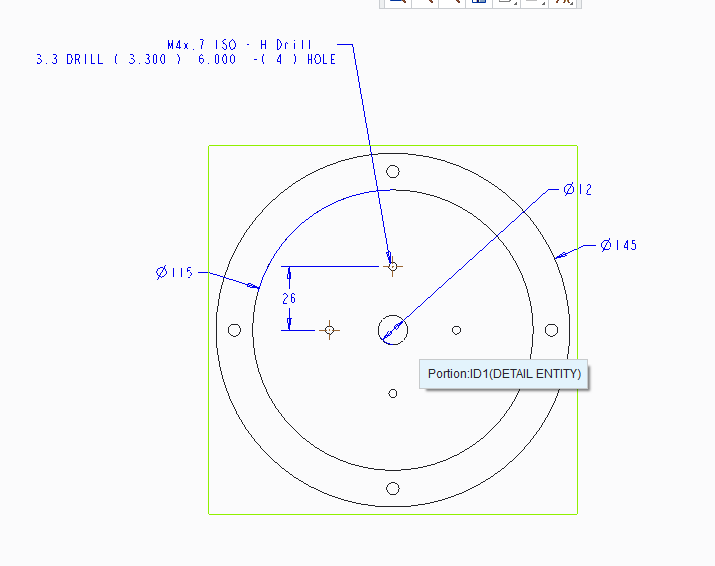
example.png

Here is the example of my drawing. I want to do the proper way instead of doing the 26mm dimension.


Thanks.


This thread is inactive and closed by the PTC Community Management Team. If you would like to provide a reply and re-open this thread, please notify the moderator and reference the thread. You may also use "Start a topic" button to ask a new question. Please be sure to include what version of the PTC product you are using so another community member knowledgeable about your version may be able to assist.

1 reply

17-Peridot
November 2, 2013

Set this in your drawing detail config option (not config.pro):

radial_pattern_axis_circle YES

If the holes were patterned on an axis and created as diameter reference in the model, you should get the BCD centerline.

Please share your file if you are still having trouble with this. It could be how you are modeling the holes if this does not work.

1-Visitor
December 18, 2015

Hello All,

I am trying to do the same thing as Muhamed, in Creo 3. I cant find the option. Can anyone help?

Or is there an easier way to do this? I don't understand why there isn't an option to add a circular centre line on the drawing.

Does everyone find drawings in Creo much more difficult than other systems or am I still on the learning curve and it will all get easier at some point?

Thanks 

23-Emerald III
December 18, 2015

As Antonius  answered, you can get the bolt circle centerline if you use a pattern and you have preset the drawing setup option radial_pattern_axis_circle YES.

In the past when making that bolt circle axis, if I couldn't add that option for some reason, I've add a sketch to the model so as to be able to show it.

Nope, Creo is notoriously poor with respect to drawings. I believe they have anticipated for years and years that drawings are going away so why spend any time improving the drawing functionality.