Greetings,
I am fairly new to using Creo and even some of my coworkers who are more familiar with the software and have use it a lot longer than me are stumped by this. So hoping someone has a resolution to this.
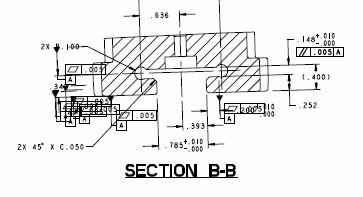
Below is an screen shot of a section view. This is taken from just one sheet of 10 with basically the same part in other variations. The Datums were created and set in the model file and shown in the drawing. When looking at the drawings in Creo all looks good the Datum's are in their respected places on each sheet. Some of the sheets do not have GD&T done on them as they are not being used. When saving, printing, and even exporting to create a PDF all the Datum's show up on all the sheets such as seen below. The Datum's were created in the model and than to be shown in the drawing. The flatness info was added in the drawing and attached to the Datum. The Parallelism callout does not have the same issue as the Datum it was created and attached to the dimension on the drawing only. I have tried printing the drawing straight from Creo and still get the same issue. It does not matter if I save the drawing just as one sheet or all 10 all the datum's.
Any helpful and informative feedback would be appreciated, Thank you.
Leo