
1-Visitor
May 16, 2017
Question

Placeing surface finish symbol problem

  • May 16, 2017
  • 1 reply
  • 2832 views

Hi all!


   I have a problem with placeing surface finish symbol, on drawings.

It works only in free placement mode, but doesn't in on entity, or other placenemt types.

Does anyone know the solution for this problem?

I have Creo 3.0 M050 Educational Edition.


Thanks:

Aron
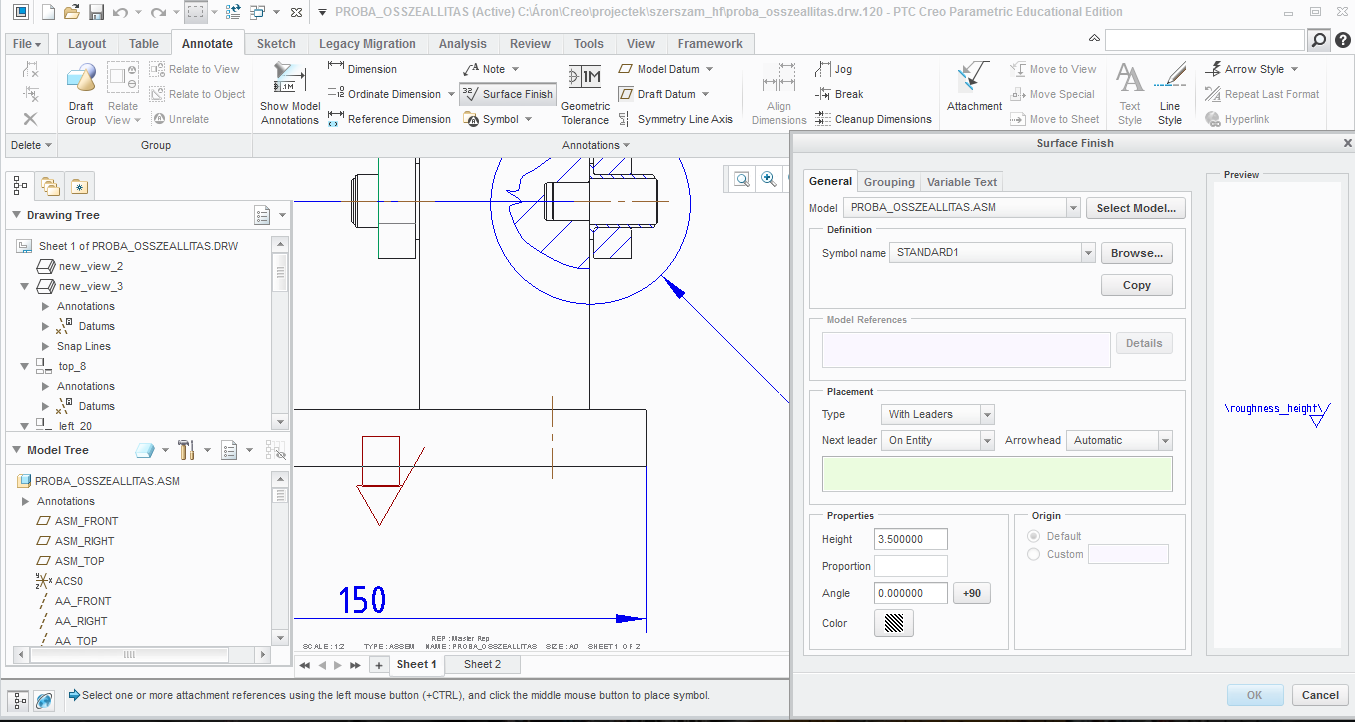


Képkivágás.PNG

1 reply

18-Opal
May 17, 2017

Hello Aron,

Add the surface finish symbol via adding symbol in drawing.  The operation was changed due to the addition of the dialogue for surface finish symbol creation.

In case of symbol placement by component edge reference, it is possible to arrange by pressing the Select Model button on the right side of the Model dialog and selecting the component parts; in the model column, selected component name is displayed.

You should then be able to select the edge of the component and MMB to place the surface finish symbol.

Thanks,

Amit