
1-Visitor
August 1, 2016
Solved

Placing parametric note for Surface Area/Volume/Mass in Drawing (Creo 2.0)

  • August 1, 2016
  • 3 replies
  • 9875 views

Hello


I am trying to show the surface of a part in a note .

To do so i tried to calculate the mass properties by going in to < File > <Prepare> <Model properties> and calculate the mass properties there.

Then in relations i defined a term "Surface_Area=PRO_MP_AREA"

After this in drawing i placed a note "&Surface_Area"

So i got the surface are of the part.

But now if i edit my part, the surface area in the note doesn't change accordingly in this method.


So please suggest a method by which if i edit my model, my values for surface area should also be changes automatically.


Thank You

Sumeet
Best answer by psobejko

I think that your problem is that, by default, the built in PRO_MP_XXX parameters do not auto-update after regeneration.

You have to go into File->Prepare->Model Properties->Mass Properties (change)->Calculate... (or Generate Report...)

However, you can calculate the mass properties upon regeneration if you set the config.pro option:

mass_property_calculate automatic

(other options available, check configuration editor)

---

2nd point: you shouldn't have to make another parameter and equate it's value to that of PRO_MP_AREA.

Just use &PRO_MP_AREA directly in your note.

----

3rd point:

Since the behavior of your model's usage will vary depending on end-user's config.pro state,

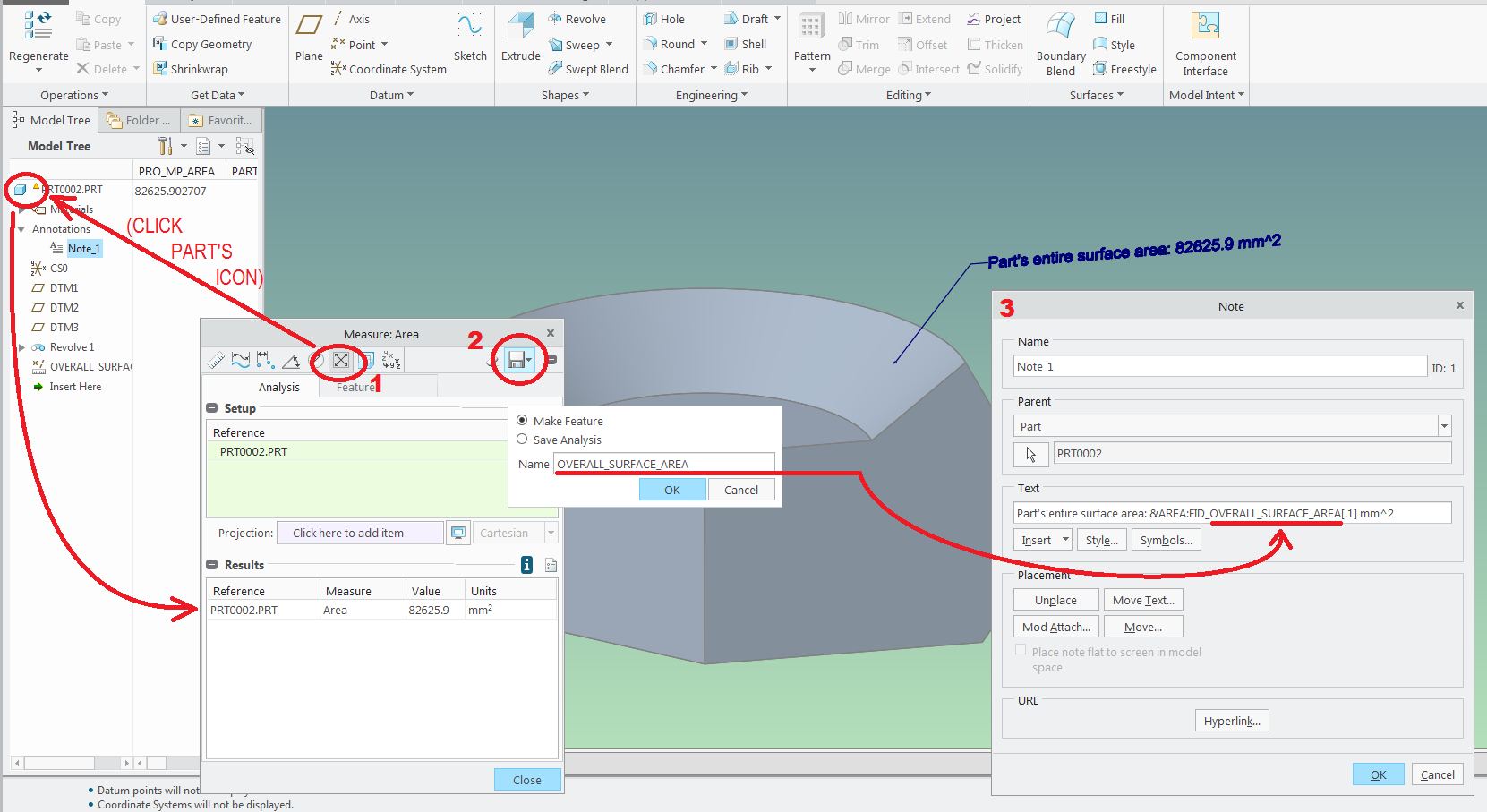
I suggest you might want to utilize the measurement tool to create an area analysis feature and then display its calculated AREA parameter in your notes:

surface_area_in_a_note.png

Notes:

1) the syntax to display the parameter AREA which belongs to a feature called OVERALL_SURFACE AREA is &AREA:FID_OVERALL_SURFACE_AREA

2) [.1] is a modification code to round the display of this parameter to 1 decimal place;

3) you'll notice that when you edit this note afterwards, the OVERALL_SURFACE_AREA will have been replaced by the feature id number.

3 replies

1-Visitor
August 1, 2016

Are you regenerating the model after the edit?

1-Visitor
August 1, 2016

Yes i have tried it.

I aslo went to 

File-->Prepare-->Model Prooerties and re calculated the mass properties

And after calculating i regenerated the model too

But in the drawing also i updated the sheet, but still not working

24-Ruby III
August 1, 2016

Hi,

if you defined Initial relation then you have to regenerate your model twice.

Please upload your model and drawing for testing purposes, if it is possible. Use How to Attach a File to a Discussion Reply procedure.

MH

1-Visitor
August 1, 2016

Can the relation be moved to the footer?

24-Ruby III
August 2, 2016

Hi,

you can define Post Regeneration relation instead of Initial.

postregen.png

MH

psobejko1-VisitorAnswer
1-Visitor
August 2, 2016

I think that your problem is that, by default, the built in PRO_MP_XXX parameters do not auto-update after regeneration.

You have to go into File->Prepare->Model Properties->Mass Properties (change)->Calculate... (or Generate Report...)

However, you can calculate the mass properties upon regeneration if you set the config.pro option:

mass_property_calculate automatic

(other options available, check configuration editor)

---

2nd point: you shouldn't have to make another parameter and equate it's value to that of PRO_MP_AREA.

Just use &PRO_MP_AREA directly in your note.

----

3rd point:

Since the behavior of your model's usage will vary depending on end-user's config.pro state,

I suggest you might want to utilize the measurement tool to create an area analysis feature and then display its calculated AREA parameter in your notes:

surface_area_in_a_note.png

Notes:

1) the syntax to display the parameter AREA which belongs to a feature called OVERALL_SURFACE AREA is &AREA:FID_OVERALL_SURFACE_AREA

2) [.1] is a modification code to round the display of this parameter to 1 decimal place;

3) you'll notice that when you edit this note afterwards, the OVERALL_SURFACE_AREA will have been replaced by the feature id number.

1-Visitor
August 2, 2016

Thank You everyone for your ideas and inputs

Sumeet