15-Moonstone
November 4, 2021
Solved

Plane settings: Colour and visibility

  • November 4, 2021
  • 2 replies
  • 5143 views

Hello!


I wonder if it is possible to change color of the planes defined in the Model Tree (Right, Top, Front)? 

Is it possible to set planes invisible, but when chosen in Model Tree, the plane gets visible?


Best regards,

Sergey

Best answer by StephenW

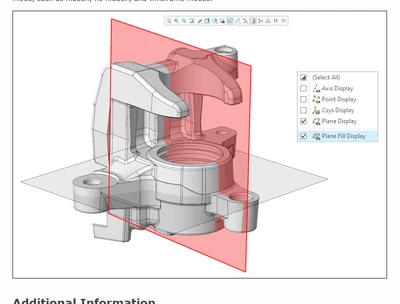
https://support.ptc.com/help/creo/creo_pma/r8.0/usascii/index.html#page/whats_new_pma/ux-shaded_3d_datum_display.html


"Filled Datum Planes" are only available as of Creo 8.0. If you are not using Creo 8, you can't "fill" your datum plane.

I'm guessing that one of the system colors controls the color of the datum fill but I don't know which.


StephenWilliams_0-1636196955992.png


2 replies

tbraxton
22-Sapphire II
22-Sapphire II
November 4, 2021

Planes can be hidden/shown by direct selection or placed on a layer and the layer hidden. I use a macro to toggle the display of the datums. For default datums I think you will find this more productive to use a mapkey.


Datum colors can be changed. File->Options->System Appearance


tbraxton_0-1636061329718.png


Sergey15-MoonstoneAuthor
15-Moonstone
November 4, 2021

Thanks for reply, it is very appreciated.

What do you mean by "I use a macro to toggle the display of the datums"?  Would you, please, make an example?


Sergey

tbraxton
22-Sapphire II
22-Sapphire II
November 4, 2021

I use a map key that toggles the datum display . I have this map key assigned to a button so it is easy to activate. It is explicitly controlling the display of planes, points, csys, and axes.

Note that this map key is not using config.pro files but exploiting some UI syntax to toggle the display. This works in Creo 4,5, and 7 for me.


!**** Datum display control using toggle; mapped to mouse
mapkey .tgd @MAPKEY_NAMEToggle DTM Display;@MAPKEY_LABELToggle DTM Disp;\
mapkey(continued) ~ Command `ProCmdEnvDtmDisp` 1;~ Command `ProCmdEnvAxisDisp` 1;\
mapkey(continued) ~ Command `ProCmdEnvPntsDisp` 1;~ Command `ProCmdEnvCsysDisp` 1;


Refer to this thread about toggle strategy for map keys.

https://community.ptc.com/t5/Creo-Modeling-Questions/How-do-I-create-a-single-mapkey-to-toggle-an-option-on-and-off/td-p/324513 

24-Ruby III
November 5, 2021