

Dale_Rosema
23-Emerald III
May 3, 2023
Question

"Printing PDF"s vs "Save As" pdf - Part 2

  • May 3, 2023
  • 1 reply
  • 1652 views

A follow up to a previous discussion I had on this subject.


https://community.ptc.com/t5/3D-Part-Assembly-Design/quot-Printing-PDF-quot-s-vs-quot-Save-As-quot-pdf-which-is/m-p/812544


I just switched to Creo 9.0.4.0

When I go to print my pdf the following is what used to happen and what is happening now.


Creo 4.0 - in the name bar for the pdf

"Filename.pdf"


Creo 9.0.4.0 - in the name bar

"Creo Parametric - Filename.pdf"


Why is the "Creo Parametric - " added to the filename when I am printing a .pdf
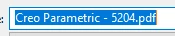
Dale_Rosema_0-1683144339974.png


Thanks,

Dale


1 reply

Dale_Rosema
23-Emerald III
May 4, 2023

I am going back to the previous mapkey:


Dale_Rosema_0-1683204879309.png

The issue I am having is that after I change the PDF Export Setting by selecting the "Options" button and selecting the correct setting name.

I then update the name to be exported and hit enter.

The "PDF Export Settings" window pops up and the cell containing the name of the current profile is activated instead of the "OK" button.

17-Peridot
May 4, 2023

That is the name on top of the Adobe window? What is the name of the PDF in Windows Explorer folder that you save it to?

Dale_Rosema
23-Emerald III
May 4, 2023

It may have been. File -> Print -> Print; Change drop down to Adobe PDF; Click "OK"

That is when I got the "Creo Parametric - filename"


That is also why I went back to:

File - Save As; Drop down - select "PDF (*.pdf)

Click "Options..."

Select my "PDF Export Settings"

Click "OK"


[For my company add a proceeding "v"]


Hit "Enter"


I record that for a mapkey but when I run the mapkey the current profile line is "active" instead of the "OK" button. I have to "Shift-Tab" twice to switch the "OK" button to be active.


Dale_Rosema_1-1683221504950.png   

Dale_Rosema_2-1683221606252.png