
1-Visitor
May 2, 2014
Solved

PRO-piping fitting parameters and isogen symbol

  • May 2, 2014
  • 10 replies
  • 4533 views

Could any one help me about following questions:

1. How the part parameters are linked with pcf file, how the parameters are connected with isogen attribute map file?

2. How to configure an user defined symbol for userdefined fittings in isogen/i-configure?

Thanx in advance.

Regards,

Jayanta Sarkar


This thread is inactive and closed by the PTC Community Management Team. If you would like to provide a reply and re-open this thread, please notify the moderator and reference the thread. You may also use "Start a topic" button to ask a new question. Please be sure to include what version of the PTC product you are using so another community member knowledgeable about your version may be able to assist.
Best answer by dlindgren

Hi,

You need to create your own separate aschii file with your own symbols.

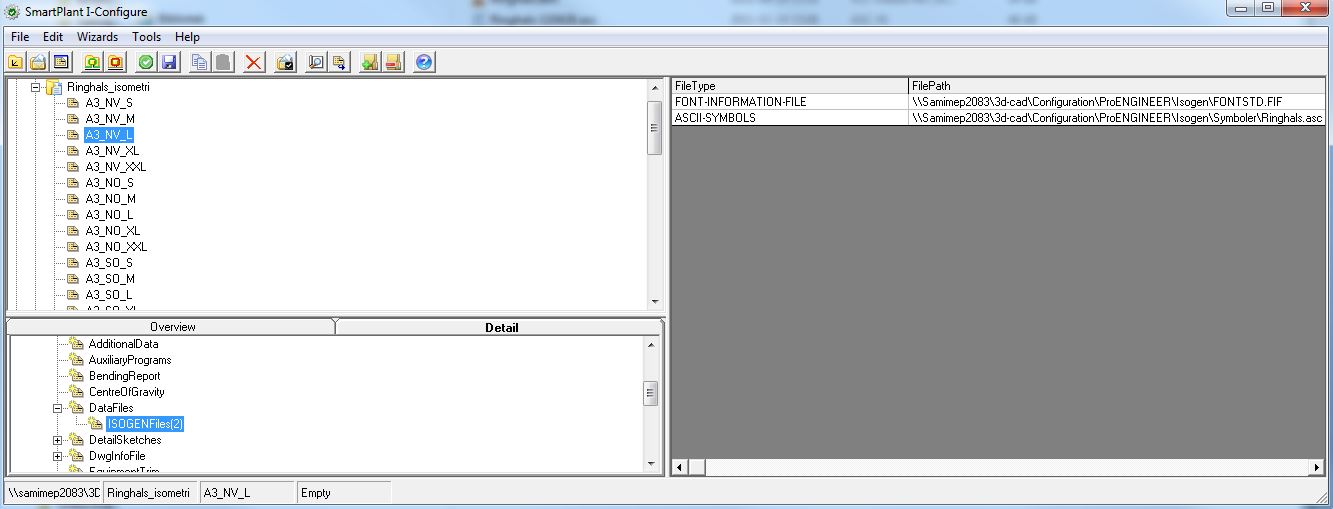
Then you map your userdefined symbolfile in I-configure

Se pic below

You map the symbol via a checks Detail Supplementary/Datafiles

Add row to right ASCHII-SYMBOLS \Searchpath\...\..\ and so on, then I-Run can find the file

If you create a symbol the symbol has to be unique - you cannot overwrite any of the symbols that come with I-sogen. I-run will always have the symbols that come with the installation. (File called: Symbols.asc)

Try to rename your IG symbol to ie. ZA** or ZAFL

(since IG is used by Symbols.asc)

If you send me an Email I can send you my own userdefined aschii file with som symbols.

Pic from I-configure

I-confiure.JPG

Best Regards, Dan Lindgren -

Consult,SpecDriven Piping and I-run expert

10 replies

2-Explorer
May 9, 2014

Hello Sarkar,

Is this a general question about how it works or the syntax of the PCF file or did you try to do something specific and failed?

Regarding symbols, there is an article in the PTC Database (http://www.ptc.com/appserver/cs/view/solution.jsp?n=CS116988), which refers to "online help of ALIAS I-Run (ISOGEN) for a mapping table including fitting types and SKEYs"

Gunter

jsarkar1-VisitorAuthor
1-Visitor
May 10, 2014

Dear Gunter,

I have sorted out the first problem. When I am clicking on your link for alias document it shows: "Error: Document 116988 is not customer viewable as it is an internal PTC document.".

I only need to configure a new user defined symbol, I have corrected the skey in pcf file, I have created a user defined symbol through symbol editor and assigned the same s key, however The symbol is not coming when generating the drawing. I feel that I am missing something may be some procodure or options. A help would be great about this.

Thanks in avance.

Regards,

Jayanta Sarkar

2-Explorer
May 12, 2014

Sorry for the error when trying to access the article - my fault!

The article had not yet been marked as public (too few uses).

I changed it now, so you should be able to view it.

I am looking forward to your feedback.