8-Gravel
March 29, 2023
Solved

Purple Lines in Drawings - was it ever fixed in newer versions of Creo?

  • March 29, 2023
  • 2 replies
  • 9285 views

Hi all,


My company is still stuck on Creo 3 (yes, I know that's ancient - supposedly our IT department is working on upgrading us to 8 - not sure what's taking so long). Anyway, a common problem we have to deal with is the dreaded purple lines that pop up in drawing files whenever an assembly has a part derived from a STEP file that isn't perfect. 


My question is: has PTC ever fixed this issue in newer releases of Creo? 


Best answer by StephenW

I am not an export on fixing imports. The users I know who fix a lot of them are usually those who have surface modeling skills. I do not. I have occasionally been able to fix some simple stuff. I always try. Sometimes the export is intentionally made to be surface models only.


For the drawing, there are settings. I have lots of surface models.. 

config.pro options

HLR_for_quilts YES

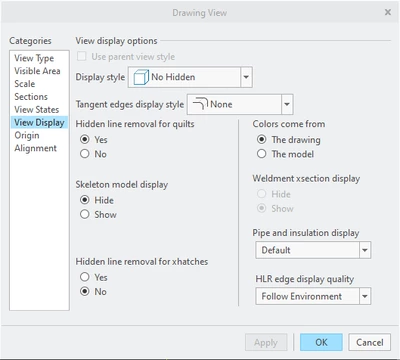
In the view settings, make sure you have "hidden line removal for quilts" set to yes. 


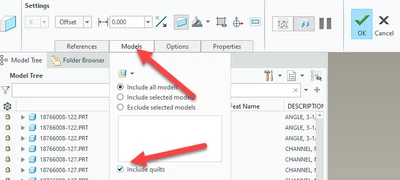
If you have cross sections on your drawing, you'll need to edit the section in the model and under the models tab and check the "include quilts" option.

Seems like I'm missing something but its been a while since I had any problems

StephenW_0-1680113403621.png


StephenW_1-1680113632436.png


2 replies

23-Emerald III
March 29, 2023

The "purple" lines would mean that the import is a surface model and not a solid model. Nothing has changed with respect to that.

Other than being a different color in the drawing, what issues are you having with them. There are several settings that make surface model less problematic on drawings.

The best solution is to try to get your step files to solidify during import, not always possible but sometimes it pretty easy, just depends on the model.

8-Gravel
March 29, 2023

Hi Stephen,

The other issue besides the color is that any part with these purple lines shows up as a wireframe in any assembly drawing that it's used in, even if "No Hidden" is selected for the display. This is a massive problem, as that means the affected part shows up through the rest of the assembly even if it's buried under a frame, panels, etc.

I'm not sure how to get the STEP file models to solidify during import. Multiple engineers here including myself have tried everything we can think of including using the meager repair tools (medical "+" symbol), saving it as shrink-wrap, trying to fix it in Solidworks first, etc. Unfortunately the STEP files we receive from many of our vendors are very complex and it isn't feasible to "fix" them in Creo. It's very frustrating, because obviously this isn't an issue in other modern CAD systems like Solidworks. I am shocked if this issue persists in newer releases of Creo.

StephenW23-Emerald IIIAnswer
23-Emerald III
March 29, 2023

I am not an export on fixing imports. The users I know who fix a lot of them are usually those who have surface modeling skills. I do not. I have occasionally been able to fix some simple stuff. I always try. Sometimes the export is intentionally made to be surface models only.


For the drawing, there are settings. I have lots of surface models.. 

config.pro options

HLR_for_quilts YES

In the view settings, make sure you have "hidden line removal for quilts" set to yes. 


If you have cross sections on your drawing, you'll need to edit the section in the model and under the models tab and check the "include quilts" option.

Seems like I'm missing something but its been a while since I had any problems

StephenW_0-1680113403621.png


StephenW_1-1680113632436.png


Patriot_1776
22-Sapphire II
March 31, 2023

Actually, count yourself LUCKY, I liked 3 better than 4, and a LOT better than 8.  The few actual REAL enhancements (instead of just "Bold New Graphics!") in 4 or 8 are way more than offset by all the stupid and useless graphics changes and the insistence of making everything a tiny new indecipherable icon now, which I find almost impossible to read now that my vision is going South.  Huh-LO, Egyptian hieroglyphics were obsoleted millennia ago for a reason....but I digress...


Best of luck!