Dale_Rosema
23-Emerald III
23-Emerald III
August 7, 2023
Solved

QC Check Points on a Drawing

  • August 7, 2023
  • 2 replies
  • 3291 views

A drawing has a couple of check points: QC_PT1 & QC_PT2.


How can these be shown in one view of a drawing but not in all the other views of the drawing? Is there a way to show points in just one view? Also, you would have to remember to turn these on all the time since typically points on now shown in drawings.


Point turns off
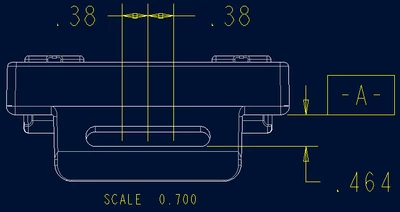
Dale_Rosema_0-1691420206955.png


Points turned on, but showing in all views:
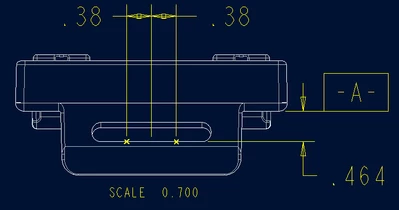
Dale_Rosema_1-1691420260857.png


This post was similar, but didn't answer what was needed:

 

https://community.ptc.com/t5/3D-Part-Assembly-Design/Showing-datum-points-on-drawings-when-creating-a-pipe/m-p/428622


Best answer by tbraxton

Enclosed is a sample model (Creo 7) and drawing where the points are visible only in one view on the drawing when points are displayed in dwg mode.

tbraxton_0-1691594801369.png

Layer tree for the drawing with all layers hidden and the layer tree for the front view (new_view1) with all layers hidden except for layer QC_pts which is shown. See the enclosed video detailing how to implement this.


2 replies

tbraxton
22-Sapphire II
22-Sapphire II
August 7, 2023

One option is the following.


Add the QC points to a layer. Hide the layer for the drawing so the points are hidden and do not show up anywhere on the drawing.

Modify the layer display for the view where you want to show the points and unhide the layer for that view only. In drawing mode, you can modify the layer display by view to filter what is shown.

tbraxton
22-Sapphire II
22-Sapphire II
August 7, 2023

This is the UI element where you can select a drawing view to control the display of layers in that view only and not affect the layers set at the top model (drawing) level.


tbraxton_0-1691421024656.png


Dale_Rosema
23-Emerald III
23-Emerald III
August 9, 2023

I marked the solution to my question per the video, but I decided not to go down that road.


The points were used to place dimension on the view.

As @StephenW suggested, sketched points were added where the dimension were.

The points were "related to view" so that if the view was moved, the sketched point will follow the view.

Here is my end result:


Dale_Rosema_0-1691599542181.png


tbraxton
22-Sapphire II
22-Sapphire II
August 9, 2023

In the context of showing points in a view associated with your dimensions I would concur with @StephenW approach being preferred. I typically use the layer display method when including much more geometry centric information such as color maps on 3D topology in the model.


I have also used inspection "points" on part designs where discrete locations are specified for a CMM probe to "land" on the part. In that case I have used tabulated dimensional coordinates on the print to facilitate programming of the CMM. On those parts I did display datum points from the model in the view associated with the coordinate table.