
10-Marble
June 7, 2018
Question

Query- Assembly-Merged Solid-Shrinkwrap

  • June 7, 2018
  • 1 reply
  • 7968 views

Hello PTC Community members,

Assembly Management


I have one large assembly & I am doing Shrinkwrap (Save as Shrinkwrap) of this total assembly.

When I follow the steps as below;

1. File--> Save As --> Shrinkwrap

2. Merged Solid -un-check fill holes

3. Clicked OK

then in message bar at down in creo, it is showing - 'Merging component' completed. (Find attached screenshot)

But at the last I am not getting Shrinkwarp file. I am getting error message as below

"xxxxx_sw0001" regeneration completed with atypical feature or component status. Failed: 1. Child of Failed: 1.
Could not create model xxxxx_SW0001. Aborting.
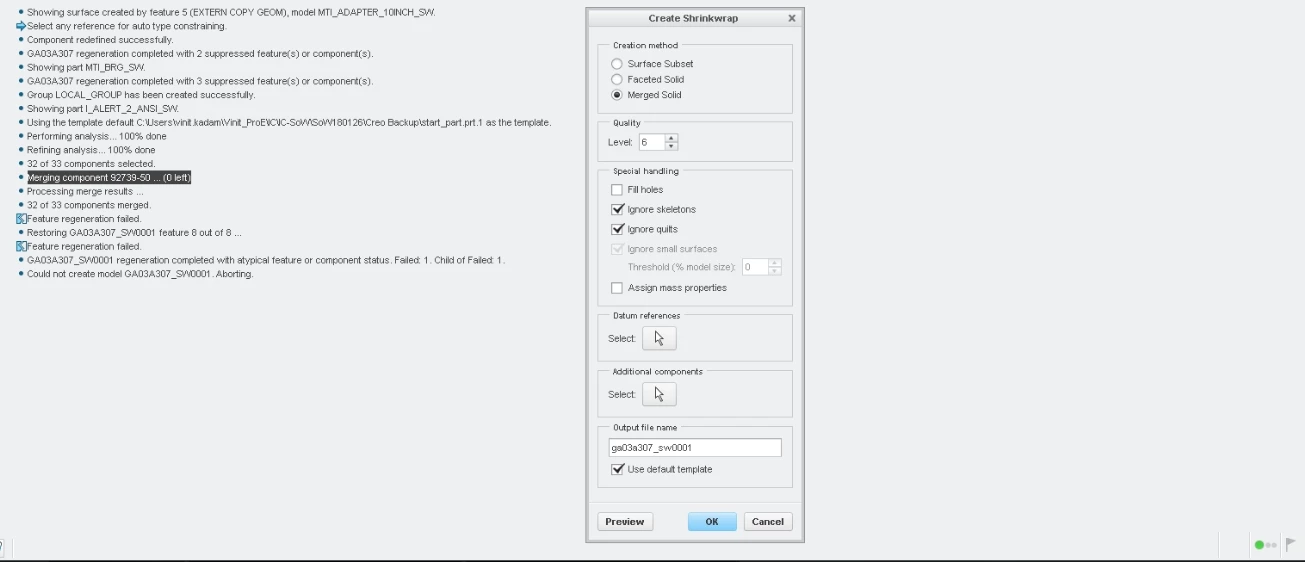
Assembly-Merged Solid-Shrinkwrap issue.jpg


How to search the exact part/feature in assembly because of which I am getting this error??

Thank you in advance.


Regards,

Vinit Kadam

1 reply

1-Visitor
June 7, 2018

One place I would look for more information is the trail file.

The approach I would take is to suppress components until the Shrinkwrap worked.

10-Marble
June 7, 2018

Hello @dschenken,

Thank you for your reply.

I opened respective 'trail.txt' file; this file contains around thousands of lines.

Please guide me how to find which part is creating issues in shrinkwrap process.


Find attached respective 'trail.txt' file. (ohh not able to attach trail.txt- getting error 'The contents of the attachment doesn't match its file type.')


Regarding 2nd approach, in my assembly there are total 83 parts (Feat# count - I mean parts & sub assemblies), so I feel this is time consuming approach to suppress components one by one. And find out the component which is causing issues in shrinkwrap process.


Regards,

Vinit Kadam

17-Peridot
June 7, 2018

Creating Shrinkwrap is quite cumbersome for assemblies many times and normally be a trial and error method.

I would first hide any surfaces, cosmetics, then check and fix any geometry checks, suppress any internal components that are not visible from outside, suppress any Text features or threads.

If there is any complex casting model, then sometimes matching the accuracy of that part and the assy will work.