14-Alexandrite
November 12, 2023
Solved

Questions about sketching drawings

  • November 12, 2023
  • 3 replies
  • 2001 views

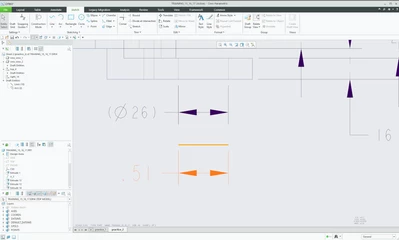
As you can see, the diameter 26 is the dimension from the modeling.

Underneath that, the orange 0.51 is a straight line sketch I made and dimensioned.

Inho__0-1699771058728.png

Now, even though it's the same straight line, one is 26 in diameter and one is 0.51.
Why is this wrong??? (The drawing is scaled 1:1 to the geometry.)


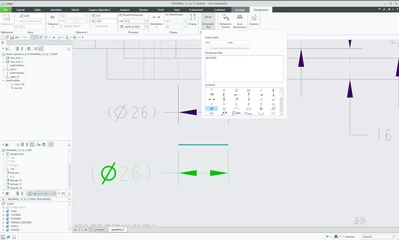
Sure, I know how to temporarily swap them, via the Dimension Text setting, as shown below, but I don't want to go through the following process every time I sketch...

Inho__1-1699771094697.png


I'm wondering if there is a way to draw a sketch and have the resulting dimensions match the ones from the modeling.


Best answer by tbraxton

It would seem you are expecting a planar straight line to automatically be associated with a diameter dimension. 

Sketch entities created in drawing mode are not equivalent to sketcher geometry in part mode. They are "dumb" and not driven by the model geometry and should be avoided.


I would strongly suggest that if you are using Creo Parametric as a design tool, in general your 3D model should drive what is on the 2D print and that you not deviate from this paradigm without a compelling reason to do so.


I can see in the tree that you are creating draft entities; can you explain why you are adding these in the drawing? If it is to get dimensions in the drawing, then it is almost certainly not best practice to do so.


Assumptions:

You sketched the orange line in drawing mode: it will get a linear dimension as you have seen. This is expected from any 2D drafting software I have ever used including Creo.


If you have a hole in the 3D model you should be able to show the feature dimensions in a drawing. If you dimensioned the diameter when creating the hole in the model, then it will appear as a diameter in the drawing when shown.


In your image above the 26 diameter is in (), this could indicate that it is a reference dimension in the model. You should investigate that and understand why it is that way in the model.


To show dimensions when in drawing mode: Annotation tab-> Show Annotations and select dimensions


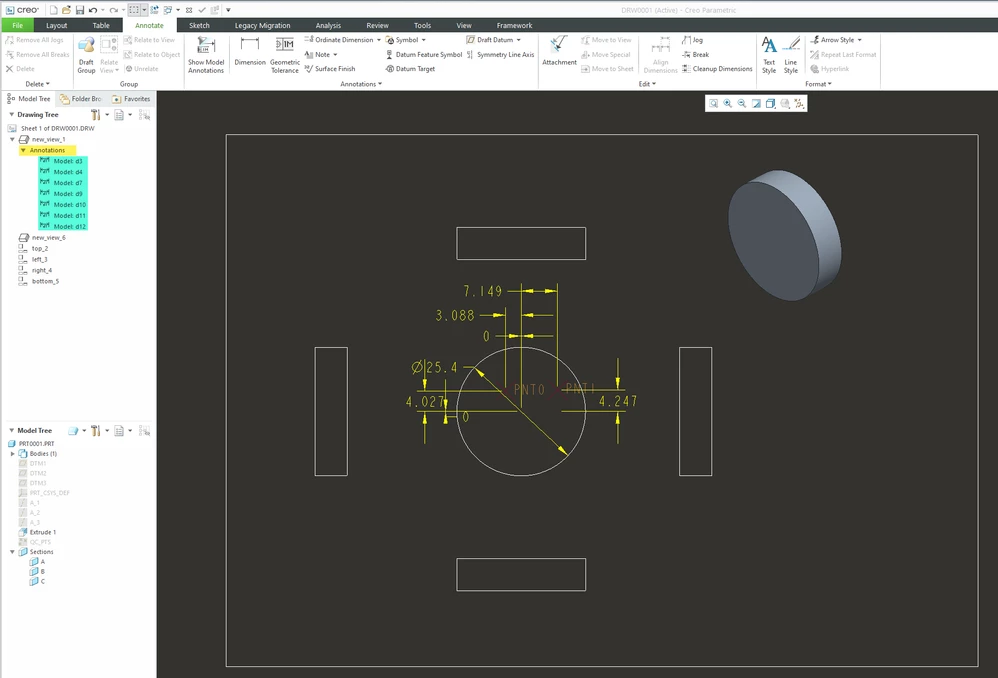
Here is a sample model and 2D drawing with annotations from the model shown on the drawing. Note the model annotations in the drawing tree. All dimensions seen below are in the model and displayed in the drawing.

 

tbraxton_0-1699796529679.png


3 replies

tbraxton
tbraxton22-Sapphire IIAnswer
22-Sapphire II
November 12, 2023

It would seem you are expecting a planar straight line to automatically be associated with a diameter dimension. 

Sketch entities created in drawing mode are not equivalent to sketcher geometry in part mode. They are "dumb" and not driven by the model geometry and should be avoided.


I would strongly suggest that if you are using Creo Parametric as a design tool, in general your 3D model should drive what is on the 2D print and that you not deviate from this paradigm without a compelling reason to do so.


I can see in the tree that you are creating draft entities; can you explain why you are adding these in the drawing? If it is to get dimensions in the drawing, then it is almost certainly not best practice to do so.


Assumptions:

You sketched the orange line in drawing mode: it will get a linear dimension as you have seen. This is expected from any 2D drafting software I have ever used including Creo.


If you have a hole in the 3D model you should be able to show the feature dimensions in a drawing. If you dimensioned the diameter when creating the hole in the model, then it will appear as a diameter in the drawing when shown.


In your image above the 26 diameter is in (), this could indicate that it is a reference dimension in the model. You should investigate that and understand why it is that way in the model.


To show dimensions when in drawing mode: Annotation tab-> Show Annotations and select dimensions


Here is a sample model and 2D drawing with annotations from the model shown on the drawing. Note the model annotations in the drawing tree. All dimensions seen below are in the model and displayed in the drawing.


tbraxton_0-1699796529679.png


Inho_14-AlexandriteAuthor
14-Alexandrite
November 13, 2023

Thank you😁
This is exactly what I was looking for.

19-Tanzanite
November 12, 2023

Your screen shot shows the scale for the sheet is 0.333 so how are you claiming that the drawing is 1:1 ?

pausob_0-1699802918434.png

If anything, I'd guess that the view shown is scaled at 1:2 - hence Ø26mm is halved to Ø13mm which leads to your 0.51inches long line on paper...

24-Ruby III
November 12, 2023

Hi,

just brief note ... sketching lines in drawing is not typical in Creo. It is typical to display a model in the drawing.