

18-Opal
March 29, 2018
Question

Reference Pattern to follow Feature Pattern and Table Pattern

  • March 29, 2018
  • 1 reply
  • 2835 views

As usual I am pushing Creo to the limit 🙂


This time I want to create a Reference Pattern which should follow a Feature Pattern and a Table Pattern at the same time.


I have created an example, see attachment (PRO/E Wildfire 4).


First I have created a simple support beam, which has a Family Table. That FT controls the pattern of the axis.

Next I created an assembly, placed the support beam and created a Table Pattern. So far so good.


What I would like to achieve, is that the peg follows both the Feature Pattern of the axis and the Table Pattern of the support beam.


I can't get my "Reference type" to show "Both", it sticks to "Feature".


Can anyone tell me if this is possible?
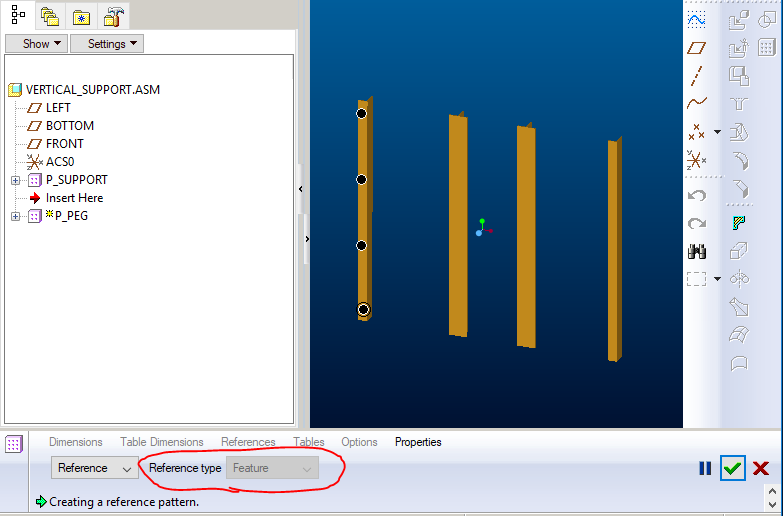
 

Reference type

1 reply

24-Ruby III
March 29, 2018

Hi,


Reference pattern can follow single pattern only. Therefore you have to create 2-direction axis pattern in assembly.

HamsterNL18-OpalAuthor
18-Opal
March 30, 2018

@MartinHanak wrote:


Reference pattern can follow single pattern only. 


Not entirely true. A Reference Pattern can follow "multiple" patterns, but the Reference type should be Both:


Reference type Both


I am using this type of pattern on a different component (a bolt) in my assembly. I first placed a bracket on the support beam, then I created a simple pattern. I then created a Reference Pattern, so the brackets follow the Table Pattern of the support beams (basicly a pattern of a pattern). As a last step, I placed a bolt and created a Reference Pattern with the Reference type "Both" so all brackets receives a bolt.


But as soon as I introduce a 2-direction pattern in my support beam for the peg to follow...I lose the ability to use "Both" as a Reference type.

HamsterNL18-OpalAuthor
18-Opal
April 5, 2018

Does anyone have an idea how to get this to work?