
1-Visitor
April 17, 2017
Question

Relate to View is grayed out?

  • April 17, 2017
  • 3 replies
  • 1803 views

I have never seen this before and do not know why Creo is behaving as though the note is related to a view?  Put a new note on a drawing, the note is selected and "Relate to View" is grayed out?  I thought it might be snapping to grid, but there is no grid.  I thought perhaps if the note is created within the boundary of the view, the note is related to the view?  No, theory is wrong.  I just deleted the troublesome note and re-added it.  I could then relate to the view.  Have no idea why the originally created note could not be related to a view?
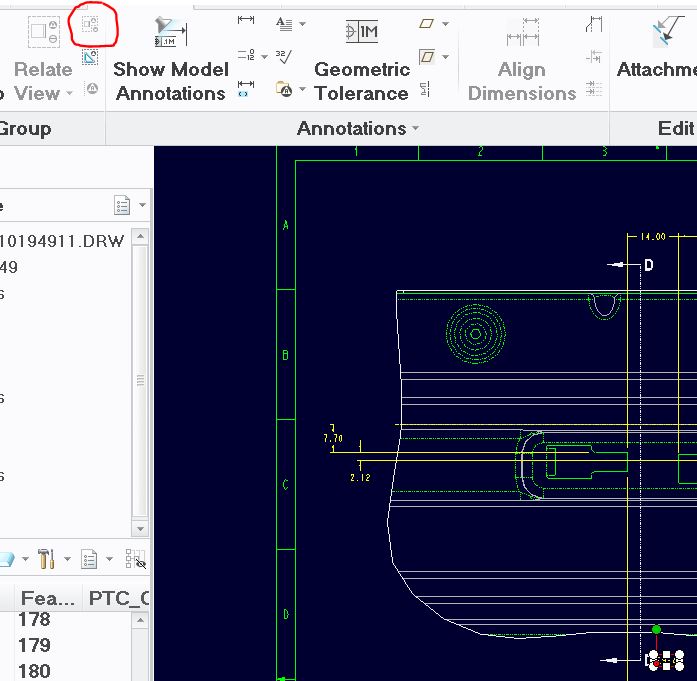
Relate to View grayed out.JPG

3 replies

StephenW
23-Emerald III
April 17, 2017

I get that on occasion too. I have always assumed it is because the note is related to an object already(possibly the object was deleted and the related part is still sort of there).

I never have really looked in to it. It always seems random to me.

1-Visitor
April 18, 2017

You can verify if the note is already related is by moving the view and see if it moves with it, or select the note, RMB and see if "unrelated" is available.

Mahesh_Sharma
22-Sapphire I
April 19, 2017

Hi Don,

Check article at https://support.ptc.com/appserver/cs/view/solution.jsp?n=CS125813

I hope this article will help.