3-Newcomer
June 4, 2025
Solved

Remove material doesn't work for small distance

  • June 4, 2025
  • 2 replies
  • 832 views

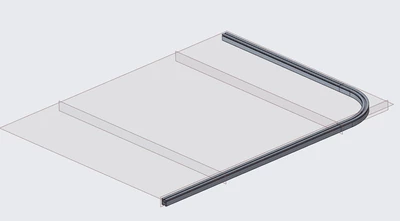
I want to make an extrude to remove material for a relatively simple assembly. However, I found that the extrude doesn't work for smaller distance say 3 inches or to the reference plane I made a little bit from the end of the track. The extrude doesn't work when I say through all or to the plane further down around the bend of the track.

HP_13571850_0-1749064981780.png


Best answer by StephenW

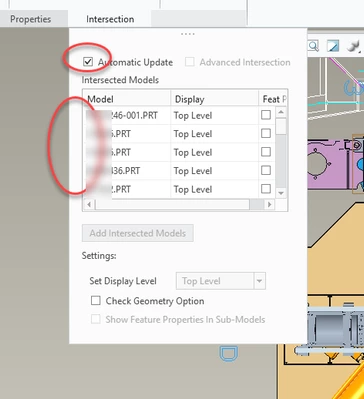
In assembly cuts, you have to make sure your "intersected parts" are what you expect them to be. You may need to uncheck "automatic update" and select the specific component you know are going to be cut.

StephenW_1-1749066843996.png


StephenW_0-1749066827608.png


2 replies

StephenW23-Emerald IIIAnswer
23-Emerald III
June 4, 2025

In assembly cuts, you have to make sure your "intersected parts" are what you expect them to be. You may need to uncheck "automatic update" and select the specific component you know are going to be cut.

StephenW_1-1749066843996.png


StephenW_0-1749066827608.png


3-Newcomer
June 4, 2025

I can confirm the model I want to cut is in the list. However it did tell me: WARNING: ASSEMBLY CUT is entirely outside the model; model unchanged. Also, the part i am trying to cut is the first part introduced in the assembly, if that's worth mentioning.

23-Emerald III
June 5, 2025

It could also be an accuracy issue. If your cut is very small w/respect to your assembly. 

WARNING: if you are changing accuracy on a large model, it could take some time and cause regeneration failures. Make sure you SAVE your work BEFORE changing accuracy, just in case.

Go to File-Prepare-Model properties- Accuracy-Change. Is your accuracy set to relative or absolute? Generally you should be set to absolute.

The smaller the number will allow smaller features to be created but will also increase regeneration time on larger models.

Accuracy changes to models can also affect Merge/inheritance feature stability.


tbraxton
22-Sapphire II
22-Sapphire II
June 5, 2025

I would not use an assembly cut unless the design intent requires it. Assembly cuts can make managing designs more difficult and there is usually a better way to handle it within Creo when considering model stability and regeneration without error. I have no insight into the design you are working on but if you can remove the material in part mode, I would do that.