

1-Visitor
March 4, 2014
Solved

Rendering with a transparent decal

  • March 4, 2014
  • 2 replies
  • 11740 views

Hi Community,

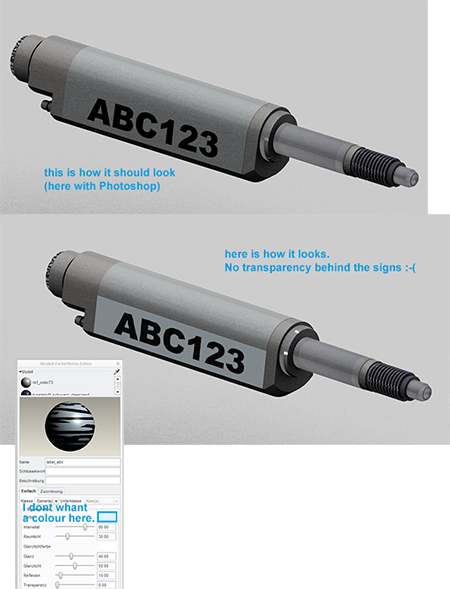
i try to add a decal with big letters on my part. For this i have made a transparent .png file.

Unfortunatelly I am not able to make this decal really transparent, because i must choose a colour.

Please see attached picture and I hope you will understand.

Thanks a lot for your help.

Andreas

------------------

Creo Parametric 2.0 | ARX Renderextension
renderproblem2.jpg

Best answer by TomD.inPDX

You use the image editor in Creo to set the alpha channel.

It is highly criptic but it does work if you guess correctly.

It is best to make the transparent color either fully black or fully white.

The file is saved as .TX4 to tell the renderer it is a 32bit file (w/alpha channel) IIRC.

2 replies

1-Visitor
March 4, 2014

Previous question went unanswered: http://communities.ptc.com/message/192346#192346

Photoshop for the win.

17-Peridot
March 4, 2014

You use the image editor in Creo to set the alpha channel.

It is highly criptic but it does work if you guess correctly.

It is best to make the transparent color either fully black or fully white.

The file is saved as .TX4 to tell the renderer it is a 32bit file (w/alpha channel) IIRC.

17-Peridot
March 4, 2014
1-Visitor
March 5, 2014

Hi Everybody,

thanks a lot, this was all really helpful. Finaly it works, but it was not easy. Much more complicated than in Solidworks.

A few things i want tell you.

- The alpha channel settings are hard to understand. To eliminate the white backround i have sucsess with these settings:

einstellungen_alpha.JPG

- Because I have a few surfaces in brushed metal without logo and one surface with logo I just copy the color "brushed metal" and add only to this copy the decal. So my Part now has 2 different brushed metal colors, one for normal surfaces and one for the logo surface.

I am sure, for this problem exist better solutions, right?

Have a good day and greetings from Germany

Andreas

1-Visitor
March 5, 2014

I took a .png that included transparency and used it as a decal and had no trouble -after- I set the transparency of the highlight color to 100%. No need to use the image editor.