
12-Amethyst
April 9, 2015
Question

Restoring default datum planes

  • April 9, 2015
  • 4 replies
  • 6410 views

Hallo,

how can I restore (or even create?) default datum planes ? (RIGHT FRONT TOP...). I have this assembly and I don't see them:
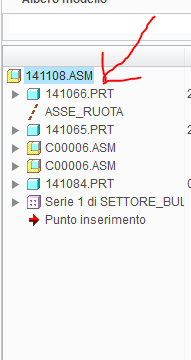
planes.PNG

thanks


This thread is inactive and closed by the PTC Community Management Team. If you would like to provide a reply and re-open this thread, please notify the moderator and reference the thread. You may also use "Start a topic" button to ask a new question. Please be sure to include what version of the PTC product you are using so another community member knowledgeable about your version may be able to assist.

4 replies

23-Emerald III
April 9, 2015

Assuming your datum planes are shown as Steven described and they still are not present.

Go to Model tab, click the down arrow by datum and select default coord system.

Drag the default coord system to be the first feature in your model, you'll have to move the first component down below the coord system.

move the "insert here" arrow to just below the default coord system so every
without anything selected, select create datum plane icon

That should automatically create your default datum planes, you will have to rename them according to your standards.

24-Ruby III
April 9, 2015

Tomasso,

I think that the assembly was created as Empty one. I guess that you cannot create default datum planes and put them at the beginning of the model tree. Maybe someone knows some trick ...

Martin Hanak

tleati12-AmethystAuthor
12-Amethyst
April 10, 2015

Hi Martin,

yes it was probably like you said. But I don't know why, these planes have suddenly disappeared (I am sure they were present before).

Bye

23-Emerald III
April 9, 2015

Thought I would clarify with images.

Assembly has no default datums, probably created empty as Martin suggested.

no-datums-1.jpg

1. Create default coordinate system under the dropdown arrow by Datum in the model tab, select detault coordinate system.
no-datums-1.jpg

2.Move the default coord system to be the first component. I selected all components in the model tree and drug them below the new coordinate system.

no-datums-2.jpg

3. Drag the insert here to just below the new coord system.

no-datums-3.jpg

4. With nothing selected, push the plane creation icon, it will create the 3 default datums

no-datums-4.jpg

5. rename the default coord system and default planes to your standard.

6. Cancel the insert here

tleati12-AmethystAuthor
12-Amethyst
April 10, 2015

Hi Stephen,

thanks for your solution, indeed I made it through as you indicated me. You meant that assembly do not have datum planes? At this point therefore I think that those I see by default are deriving from the start part...

bye

14-Alexandrite
April 12, 2015

Tommaso,

Maybe this can work,

1.jpg

2.png

3.png

If you need them in the model tree, maybe you should post another question.

tleati12-AmethystAuthor
12-Amethyst
April 13, 2015

Hallo Ruben,

thanks for your reply. No, I do not need them just in the model tree, but just them to be present.

In fact you can see below that in the layer tree I don't have any mininal sign of the original datum planes, but only of the three planes I have added in the way Stephen suggested. See both above under "01_ASM_ALL_DTM_PLN" (where C0006 is just the bearing), and below under the voice "piani" (that is the Italian of "planes").

planes.PNG

bye bye

Tommaso