
1-Visitor
December 6, 2013
Question

Retrieve "Exclude"d feature

  • December 6, 2013
  • 2 replies
  • 2058 views

Hi folks,

I am working on WF 5.0.

I just applied Exclude option.

after that feature was gone.

how to retrieve that feature back?
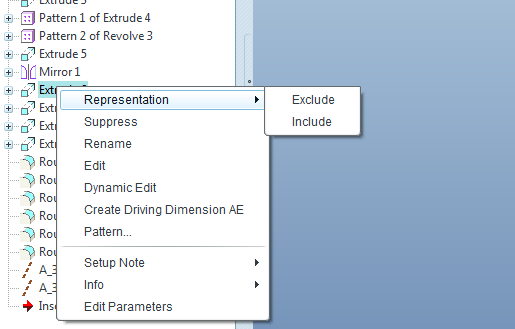
exclude.PNG

Apriciate if anyone help us.

Aravik


This thread is inactive and closed by the PTC Community Management Team. If you would like to provide a reply and re-open this thread, please notify the moderator and reference the thread. You may also use "Start a topic" button to ask a new question. Please be sure to include what version of the PTC product you are using so another community member knowledgeable about your version may be able to assist.

2 replies

AraviK11-VisitorAuthor
1-Visitor
December 19, 2013

Any answer for this query?

17-Peridot
December 19, 2013

Not knowing WF5 makes it hard to specify the exact steps, but in Creo it is managed in the Display Manager. Actually, I think you have to save it to make it permanent. These things are so convoluted it is hard to know exactly what all is affected when you do this, but there are several locations that you can toggle their state. I'm pretty sure you can activate the column in the Model Tree to show its state as well.

17-Peridot
December 20, 2013

click the picturedfg.gifalso you can use the find tool to look for the exclude features,and click this pictureone.gifIt's very useful! I love the find tool.