
14-Alexandrite
March 7, 2025
Question

Save a Copy of an Assembly with Drawings

  • March 7, 2025
  • 5 replies
  • 1200 views

Hi Folks,

Using CREO 7.0.8.0

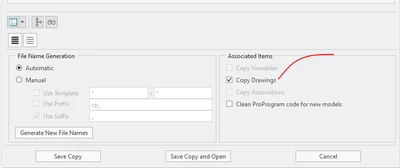
I have never been able to understand what the purpose of the radio button designated 'Copy Drawings' is for. I always have it selected when copying an assembly in the graphics window, but drawings are never copied, neither for the renamed assembly nor any of the renamed sub components. What is the purpose of this selection? Thank you.
Copy Drawings.PNG

5 replies

13-Aquamarine
March 7, 2025

If the associated drawing is in session, it will also be "Saved As" to the same directory.  Works in 8.0.

wbottis14-AlexandriteAuthor
14-Alexandrite
March 7, 2025

I just gave it a shot. I opened the top assembly and the drawing as well as a sub-assembly and its drawing, then saved the top-assembly with 'Copy Drawings' checked. Not even the top assembly drawing with the new name was created.

StephenW
23-Emerald III
March 10, 2025

Once I learned how to use windchill to save-as and keep drawings associated, I never use creo to do a save-as, except for maybe the simplest of parts drawings. In windchill, pre-select the items you want to save-as, then go to File-save as. Even more advanced in windchill, is if you want to do a save as on a part or assembly that is in an upper level assembly and you want the new part/assembly in that upper level assembly, you can use the next button in the save as window and replace it during the rename, along with keeping all the drawings connected as expected.