
7-Bedrock
October 24, 2018
Question

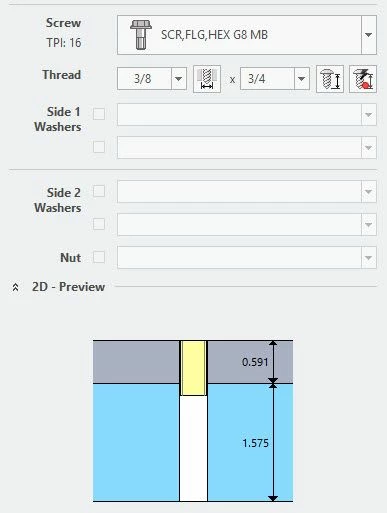
Screw head for custom screwtype not showing in preview

  • October 24, 2018
  • 5 replies
  • 3211 views

Hello,

I am trying to make a screwtype for hex head flange screws. We where using screwtype 99 for them, but we have a lot of them so we wanted to make it have it's own screwtype. I was able to copy the screw_01 folder and give it a new number. the issue I am having now is in the 2d preview the head of the screw is not showing10-24-2018 9-52-44 AM.jpg
5 replies

17-Peridot
October 24, 2018

Hi,

you always have to make sure that all necessary dimensions are listed in your *.dat file. 

For your screw I think the screw type 20 will fits best.

In the image you see all dimensions which are mandatory to paint the 2D-preview in the IFX dialog. In your case I think the value K is missing. So no height could be shown. Or you have the wrong screw type.

Here you find a list with all available screw types.


If you need more assistance, just upload your *.dat file and I will have a look at it.


Regards,
Oli Gräbner

wcasteel7-BedrockAuthor
7-Bedrock
October 24, 2018

The screw type 20 is missing the flange that goes on it. I tried to make it be screw type 83,when I use screw type 99 in the .dat file it work just fine. We wanted to create a new screw type so the preview would show the flange. Here is a copy of the dat file I am using and a zip file of the screw 83 folder I made


17-Peridot
October 24, 2018

Hi,

you cannot add new screw types with different shape by yourself. Only the given screw types can be used.

If you have a special screw, just use screw type 99.

Then you give the maximum size of your screw head and IFX will paint the preview with a dotted rectangle.


I will have a look to your *.dat file tomorrow.

17-Peridot
October 25, 2018

Hi,

today I had a look at your *.dat file.

It is not possible to add a special screw type like yours. 


In your case you have to use the screw type 99.

Find attached the corrected *.dat file. These files will show this result:

example.png


NOTE: You have to cleanup all your empty tabs. I know this makes it easier to read, but IFX cannot handle this. See the attached *.dat for an example.

empty_tabs_error.png


It might be helpful in some cases to copy the table (start with the row SYMBOL) to EXCEL, make your changes and copy it back again.


One more hint: Just place the icon directly in your "ifx_fastener_data" folder. For more details see also the topic Fastener Icons.

17-Peridot
November 7, 2018

@wcasteel could you solve your problems with your screw type?