10-Marble
September 12, 2025
Question

Semantic Text Verify--Model Check

  • September 12, 2025
  • 5 replies
  • 727 views

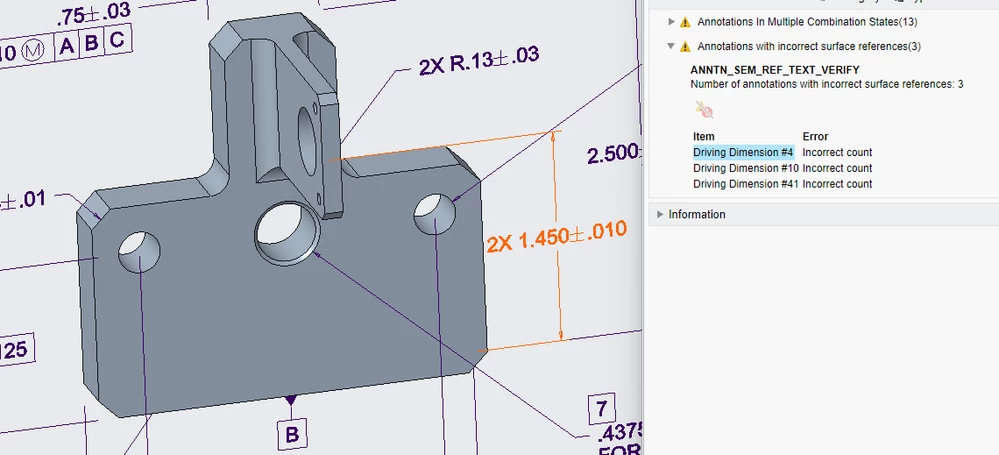
I am using Creo Parametric 10.0.4.0 and performing a Model Check on a part and I am looking at the warning for "Annotations with incorrect surface references" which has the name ANNTN_SEM_REF_TEXT_VERIFY.

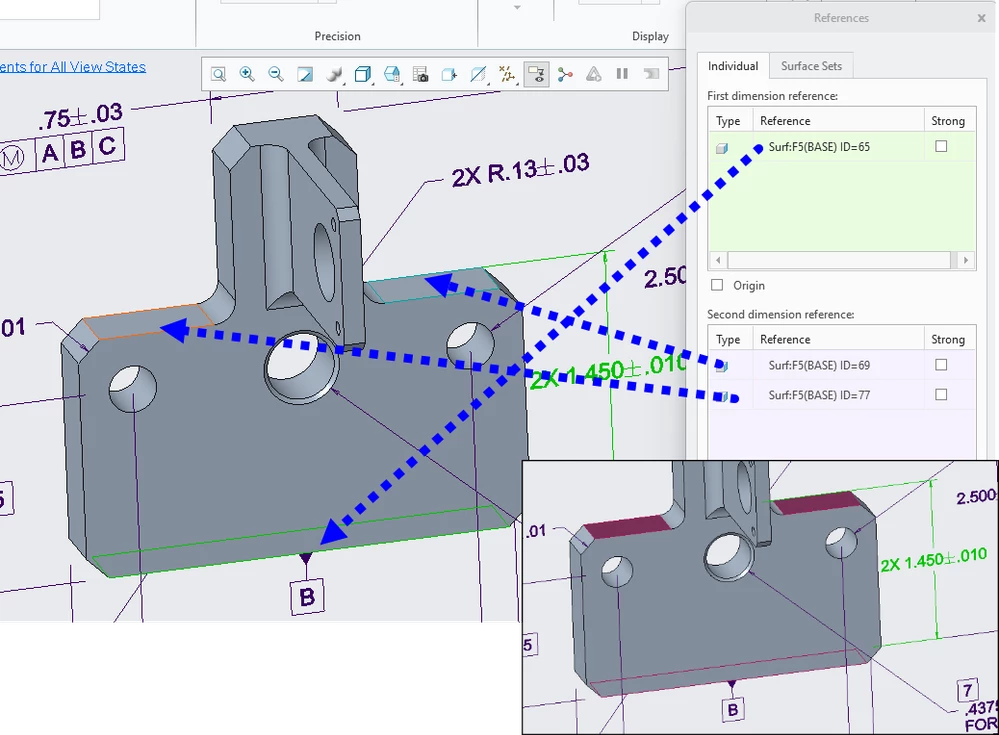
It is telling me that I have the incorrect number of annotations with incorrect surface references.  I am trying to indicate that there are two surfaces that are 1.450 away from datum B, so in the references, I have datum B in the "first dimension reference" and then the two surfaces in the "second dimension reference."  So why is Model Check flagging this?  Am I doing it incorrectly?image.pngimage.png
5 replies

24-Ruby III
September 14, 2025

Hi,

please open Case at PTC Support.

16-Pearl
September 14, 2025

ModelCHECK doesn’t accept multiple surfaces as a single “second reference.” Each semantic dimension or annotation must reference exactly one valid surface per reference. If you try to bundle multiple geometry items under a single reference, ModelCHECK sees that as ambiguous or unstable.

14-Alexandrite
October 13, 2025

I tried to simulate the case. It works perfectly without any modelcheck error.

Check the following....

  • Angle between the bottom and the highlighted surfaces. (it should be zero)
  • Distance between the two surfaces that are included in the second-dimension reference. This too should be zero.

I see that you are on Creo Parametric 10.0.4.0. I am on Creo 10.0.9.0. Updating might help.

3-Newcomer
December 8, 2025

I tested this in 10.0.9.0 and the issue was with the 2X. 
When I removed the 2X and replaced it with the continuous feature symbol or "multiple surfaces" under the dimension, modelCHECK had no issues.

I am not strong enough in GD&T to know if this is because of a ruling there or if it is something on the Creo end involving the actual count of how many 1.45" dimensions there are in the model.

14-Alexandrite
December 22, 2025

In my opinion Creo is Correct.

2X would mean Two Distinct Features.

In the design the First surface remains the same and there are two different surfaces for the second surface. You may try and add additional surfaces under Surface Sets. ModelCheck does not return an error.

Srinivasan_Iyer_0-1766378813578.png


10-Marble
December 22, 2025

This works, but it seems like a bit of a workaround, and it doesn't feel right.

16-Pearl
February 25, 2026

I was testing this and noticed that shown dimensions do not create the needed sematic references. Only created dimensions. This surprises me as we are all taught to use shown dimension instead of created dimensions. So I am perplexed why only created dimensions get their respective semantic surfaces. Has anyone else noticed this and have an explanation?

14-Alexandrite
February 26, 2026

Yes. I did notice this. As a good Practice I Show Driving Dimensions and then painstakingly reference the dimensions to the surfaces. A manual process but the dimensions are Driving Dimensions.

Plausible explanation could be that the Driving Dimensions are attached to the Sketch and thus to the edge.


I am using Creo 10.0.9.0. Hoping that in Creo 12, PTC has built some intelligence to the Shown Dimensions as an improvement to MBD.