
1-Visitor
April 17, 2012
Solved

Setting a layer rule for all components that are "hidden"

  • April 17, 2012
  • 2 replies
  • 2882 views

I looked at the layer rules and didn't see for what I was looking.

I want to set up a layer where all hidden components, be it a part or an assembly, reside. The reason I want to do this, is at the end of creating an assembly, I want to "unhide" everything I've hidden in order to get everything assembled. I don't want to have to seartch through the tree and drill through sub-assys to find the hidden culprits.

Is there a way to do this? Please advise and thanks for your help!


This thread is inactive and closed by the PTC Community Management Team. If you would like to provide a reply and re-open this thread, please notify the moderator and reference the thread. You may also use "Start a topic" button to ask a new question. Please be sure to include what version of the PTC product you are using so another community member knowledgeable about your version may be able to assist.
Best answer by BrianMartin

Hi Kris...

Do you mean something simple like View->Visibility->Unhide All? Or are you after something more complex?

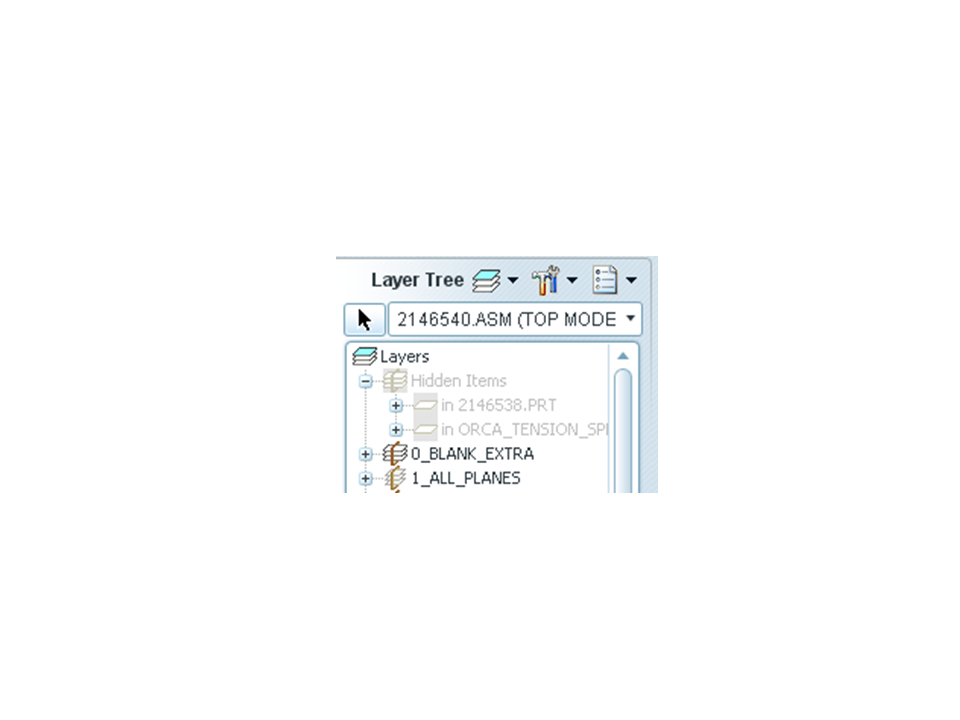
Your top level assembly model should automatically have a layer called Hidden Items which contains all objects that have ever been hidden.

layer_hidden.png

Then again maybe I'm just not understanding what you're after. Can you explain a bit more... I'll try not to be so dense!

Thanks!

-Brian

2 replies

13-Aquamarine
April 17, 2012

Hi Kris...

Do you mean something simple like View->Visibility->Unhide All? Or are you after something more complex?

Your top level assembly model should automatically have a layer called Hidden Items which contains all objects that have ever been hidden.

layer_hidden.png

Then again maybe I'm just not understanding what you're after. Can you explain a bit more... I'll try not to be so dense!

Thanks!

-Brian

KrisR1-VisitorAuthor
1-Visitor
April 17, 2012

i did not know about View->Visibility->Unhide All. That's a goodie!

I did now see that there is a hidden items rule, but I notice that you cannot right click->unhide with it.

But View->Visibility->Unhide All should do the trick!

13-Aquamarine
April 17, 2012

You can right-click and Unhide from the Hidden items section of the layer menu provided you have the access rights to modify the object you're working on. If you have Pro/INTRALINK or Windchill, you have to have the model checked out or at least set to "continue" to be able to right-click and Unhide.

That may or may not be the issue... it gave me a hard time for a moment but then it started working. Maybe there's a glitch in there somewhere.

Anyway... good luck!

-Brian

Patriot_1776
22-Sapphire II
April 18, 2012

You can even do a "Save Status" to save the visibilities.

1-Visitor
April 20, 2012

Create a Layer and right Click and hide what ever you want. You can do this in Dwg mode and hide Surfaces also.