
1-Visitor
May 13, 2014
Solved

Sheet Metal Drawing - how can I update drawing with single bending line.

  • May 13, 2014
  • 3 replies
  • 3556 views

For the sheet metal drawings, when I make flat state view in the drawing, it is two lines at the bend. but for simple representation, i need to have only single bend line.


This thread is inactive and closed by the PTC Community Management Team. If you would like to provide a reply and re-open this thread, please notify the moderator and reference the thread. You may also use "Start a topic" button to ask a new question. Please be sure to include what version of the PTC product you are using so another community member knowledgeable about your version may be able to assist.
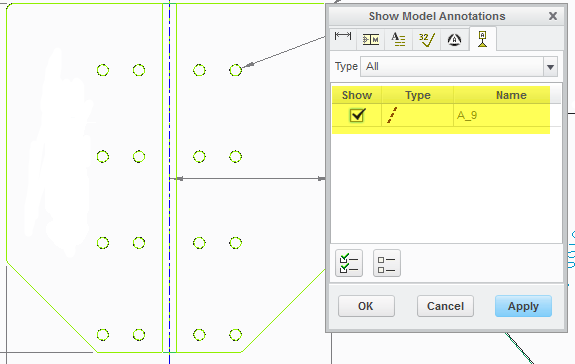
Best answer by AndyHermanson

You need to show the axis that is created. bend+line.png

3 replies

14-Alexandrite
May 13, 2014

You need to show the axis that is created. bend+line.png

1-Visitor
May 13, 2014

Thanks @andy,

Will it be any possible way to get the axis to be generated automatically when I create Flat State or Flat Pattern.

14-Alexandrite
May 13, 2014

I dont think so since it is a model annotation...I could be wrong though.

1-Visitor
May 14, 2014

Thanks Andy & Stephen,

Extended reply please need your inputs... In the figure shown below... can it be possible to hide the lines and need to have the axis visible.

ProE_PTC_01.jpg

As you can see... I need to have only axis line... but the other lines which are light gray color... i wanna hide it.

15-Moonstone
May 14, 2014

double click the drawing view, click on view display option, and then select "none" under tangent edges display option.

1-Visitor
May 14, 2014

Thanks Rohit, Andy & Stephen...

I am very happy to have my query solved in less than 24hrs.

Thanks all... Hope to come acros with another question.

Regards.

Nasrullah.