4-Participant
March 28, 2024
Solved

Sheet metal Forming

  • March 28, 2024
  • 2 replies
  • 2691 views

Hi, 

Creo-8

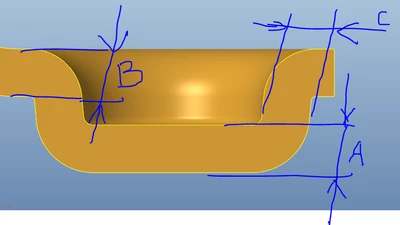
I would like to get sheet metal part with different thickness after forming ( coining ) operation 

like the attached image below. Any idea 
AC_10274110_0-1711646564403.png


Best answer by Patriot_1776

As Ben mentioned, sheet metal, while you can do punch and die operations, it will NOT (to my knowledge, at least with Creo 😎 thin the material out.  You COULD do all the work in sheet metal, and then MANUALLY do a cut to thin the material out.  OR try and do it as a regular solid model and make a shell feature with different thicknesses and it MIGHT work.

2 replies

23-Emerald III
March 28, 2024

Creo Sheet Metal is for press brake operations of uniform material thickness. Die forming is a different operation and cannot be done in the sheet metal module.

Model your section profile and revolve it will be the best method for creating the solid model boss/dimple to your required thicknesses.

You could model the cross-section into a press brake operation to get an approximate 'flat pattern' length, but die forming does not deform the material the same way a press brake operation does.


Patriot_1776
22-Sapphire II
March 28, 2024

As Ben mentioned, sheet metal, while you can do punch and die operations, it will NOT (to my knowledge, at least with Creo 😎 thin the material out.  You COULD do all the work in sheet metal, and then MANUALLY do a cut to thin the material out.  OR try and do it as a regular solid model and make a shell feature with different thicknesses and it MIGHT work.

