1-Visitor
April 10, 2020
Solved

sheet metal half-shear button

  • April 10, 2020
  • 2 replies
  • 6947 views

Hi ... CREO4 user ..... trying to create a half shear button in sheetmetal part ... what is easiest/best way?

Best answer by pausob

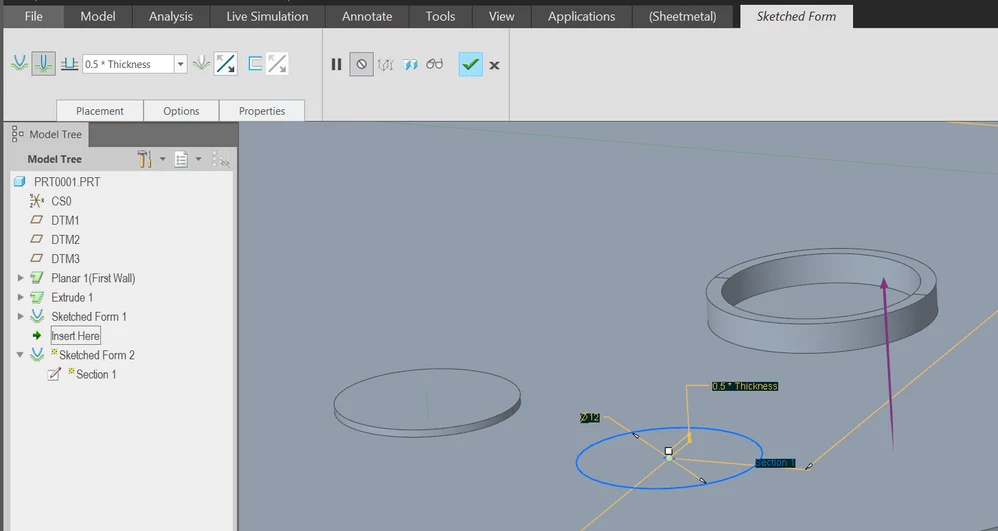
In the sheetmetal, use sketched form, change type to "piercing" instead of "punched" (2nd icon in the ribbon).

Then just sketch a circle...


half_shear_buttons.png 

2 replies

1-Visitor
April 10, 2020

BTW ... I tried to do a "sketched form punch" .... it made the small half-punched hole in the front surface, but creates a larger (added sheetmetal thickness) plug diameter on the back surface.    Hole diameter in front and plug diameter in back should be the same on a half shear button

23-Emerald III
April 10, 2020

Not sure what you mean by a half-sheer button, but how do you punch material and get the same diameter on both sides of your sheet?  The material has to be deformed someplace and I would expect the back side to be larger than the punch by the material thickness.


1-Visitor
April 10, 2020

A half-shear button is a common sheet metal practice used for accurately locating parts prior to spot welding   ….. it basically punches a hole at half-depth on the front surface while creating a plug, of same diameter, at half depth out from the backside surface.

I’ve been able in the past to create this on solidworks sheet metal parts with just a two step process …. 1) create a hole at half depth on the front  2) create an extrusion out the back   ……………. But I can’t seem to do it in CREO


pausob19-TanzaniteAnswer
19-Tanzanite
April 11, 2020

In the sheetmetal, use sketched form, change type to "piercing" instead of "punched" (2nd icon in the ribbon).

Then just sketch a circle...


half_shear_buttons.png 

1-Visitor
April 13, 2020

Perfect …. thank you very much !!