

Sheetmetal round/chamfer merges adjacent flanges
Hi everyone,
I am having some trouble after recently updating from Creo 6 to Creo 8. As far as I remember this was never a problem in Creo 6, but I don't know if there could be some difference in a config/bug arising as a result of my organisition's specific distribution.
Problem:
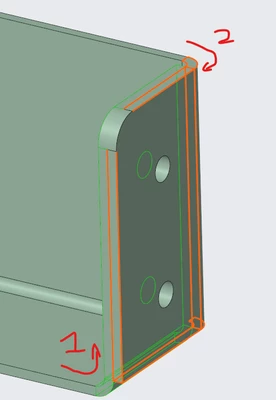
I am creating a sheet metal part with two overlapping flanges whose flat faces 'meet' to create a more sturdy fixing point when riveting the part in place. The position of one bend is offset by the thickness of the material to create the overlap without the flanges actually intersecting. I would like to apply a round to the corners, however this causes a big problem. When the round (or chamfer) are applied across the two independent corners the resultant geometry instead creates a single franken-flange by merging the two at the round. The image below shows the part I am working with. The two bends are numbered, while the problem area is marked with 'P'. The two flanges still highlight individually if selected via the model tree, but otherwise the flat edges are continuous, as if created from a single solid flange. If I then try to create an extrude cut in the affected franken-flange it's treated as a single solid body, with the 'up to next' option cutting through the whole model rather than a single original flange. This problem also results in me not being able to create a flat for manufacturing, as it throws up an error instead.
Does anyone have any experience with this? I have looked through the settings of the round function, but could not see any mention of a merge setting. Perhaps there is a config option for this? Or could this be a bug?
Workarounds:
As far as I have tested the only ways to get around this problem are to:
1) Create two separate round operations, one for the inner flange, and one for the outer. This preserves the two individual flanges, but creating two sets within the same round operation will not.
2) Add the round operation after an unbend operation, thereby separating the affected edges/faces.