
12-Amethyst
October 9, 2020
Question

Show lines of thread in drawing

  • October 9, 2020
  • 5 replies
  • 17206 views

Hey guys, i am using PTC Creo Parametric 7.0 (Student Edition)

I created a thread on a pin.

Unfortunately, it does not really show the outlines (actually the inner lines) of the thread:
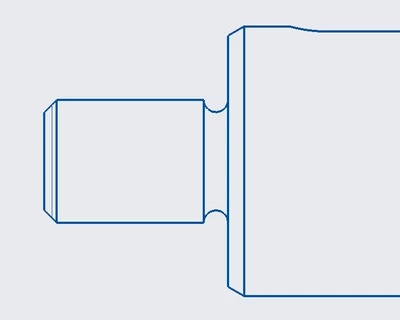
pic1.png

My visibility option is on "only show visible edges / lines"
If I select "show also not visible edges / lines", creo will show the whole thread but also everything else, which is not good for me.

Can somebody help me with this problem?

Greetings,

Spedex

5 replies

kdirth
21-Topaz I
21-Topaz I
October 9, 2020

You can use Edge Display in the edit section to control the visibility of lines.

  • Select edge display
  • Select view settings for line
  • Select one or more lines (will highlight unshown lines as your curser passes over)
  • Select OK
There is always more to learn.
Spedex12-AmethystAuthor
12-Amethyst
October 9, 2020

pic2.png

What should i do now? I clicked on "Edge Display" and selected the hidden edge. But after pressing OK or Done, nothing changes.

Spedex12-AmethystAuthor
12-Amethyst
October 9, 2020

Video of it:


16-Pearl
October 9, 2020

Hi, 


Is your part externally threaded or internally threaded? It's hard to tell from the screenshot. I would assume external based on the relief cut...???


How were the threads created? Are they actually modeled or did you use a cosmetic thread feature? If you used a cosmetic thread feature, you won't be able to see the threads. The cosmetic feature is just a surface. You'll be able to see the edges of the surfaces but nothing in the middle. 


How it looks in 3D:

Tdaugherty_0-1602253423505.png


How it looks in 2D:

Tdaugherty_1-1602253663570.png


View display settings for the drawing view:

Tdaugherty_2-1602253690364.png


I tell my guys to avoid 3D threads whenever possible due to their affect on performance. We use cosmetic thread features in applications like these. To call it out on the drawing, we just use a manual leader note (not the best method but it's quick). 


Ty

Spedex12-AmethystAuthor
12-Amethyst
October 9, 2020

I am using an external thread (cosmetic thread) and i dont see the edges, as you can tell from the picture.

23-Emerald IV
October 9, 2020

Where is this visibility option you're talking about?  I'm not seeing anything with that name...


TomU_0-1602257948437.png


Spedex12-AmethystAuthor
12-Amethyst
October 9, 2020

I was using the german version of Creo. That's why it was hard to translate. Changed it to English now.

24-Ruby III
October 11, 2020

@Spedex wrote:

Hey guys, i am using PTC Creo Parametric 7.0 (Student Edition)

I created a thread on a pin.

Unfortunately, it does not really show the outlines (actually the inner lines) of the thread:

pic1.png

My visibility option is on "only show visible edges / lines"
If I select "show also not visible edges / lines", creo will show the whole thread but also everything else, which is not good for me.

Can somebody help me with this problem?

Greetings,

Spedex


Hi,

to hide cosmetic thread in specific drawing view:

  • in model ... put cosmetic thread into new layer
  • in drawing ... hide the layer in specific drawing view, only


4-Participant
December 12, 2022

You need to change the drawing option setting 'hlr_for_threads' to 'NO' 

4-Participant
February 10, 2025

I was just dealing with similar situation in CREO 9
One view had no cosmetic threads but side views were showing them. Even in crossections.
Result - long right click in the troubled View and there was >>unerase cosmetics<< in the menu.