Solved
Show Skeleton Model Axis, Creo 2
Hey folks,
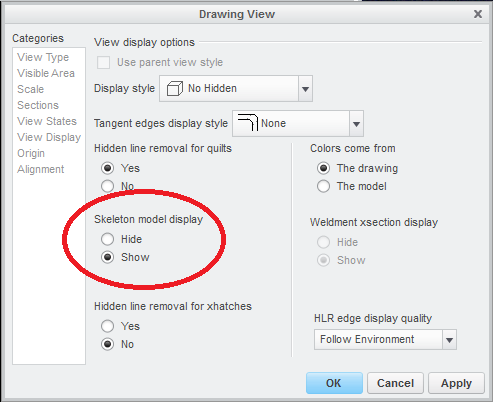
I have a drawing with views being driven by an assembly simplified rep. One of the components is a skeleton part which contains some important axes. Even though I'm usually able to successfully manipulate the silly new Show Model Annotations box, I'm stumped as to how to get those axes from the skeleton.prt to show so I can dimension to them. Most of the other components' axes show up for selection, but some do not - including the skeleton. The skeleton.prt is part of the simp rep (derived from top-level Master), so I assume I can eliminate that as the cause.
What am I missing, or am I not able to do this at all?
This thread is inactive and closed by the PTC Community Management Team. If you would like to provide a reply and re-open this thread, please notify the moderator and reference the thread. You may also use "Start a topic" button to ask a new question. Please be sure to include what version of the PTC product you are using so another community member knowledgeable about your version may be able to assist.