1-Visitor
March 27, 2012
Solved

Showing tolerances in edit mode - how to turn off?
  • March 27, 2012
  • 8 replies
  • 4955 views

1.png

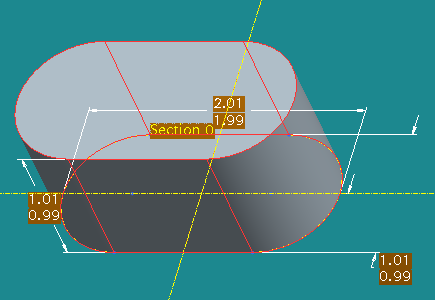
Could someone please advise me on how to get rid of the tolerance display in edit mode? Thank you!


This thread is inactive and closed by the PTC Community Management Team. If you would like to provide a reply and re-open this thread, please notify the moderator and reference the thread. You may also use "Start a topic" button to ask a new question. Please be sure to include what version of the PTC product you are using so another community member knowledgeable about your version may be able to assist.
Best answer by egifford

Kris,

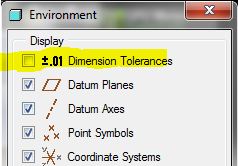
Go to the Tools menu, Environment and uncheck the Dimension Tolerances setting under Display, then click on OK at the bottom of the Environment dialog.

env_tol.JPG

This can be controlled with a config setting (options) of "Tol_Display" set to "No".

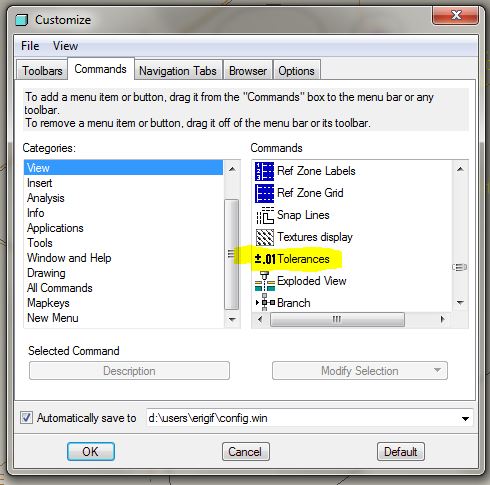
You can also use "Tools" "Customize Screen" to add a button to your toolbar to toggle the tol display on / off.

tol_disp_btn.JPG

(drag the "Tolerances" function / button to an appropriate toolbar in your Pro/E screen so it is there as a toggle)

Erik

8 replies

KrisR1-VisitorAuthor
1-Visitor
March 27, 2012

I'm going through the PTC Precision LMS tutorials and every single one of the models I open has limits set - I can't change dims as instructed through the tutorials. I'm assuming this is template driven but I do not know how to shut it off.

1-Visitor
March 27, 2012

I would hope that there is a way to change them all to nominal display at the same time, but until we find out you can do this:

right-click on the dimension, select Properties, then set the tolerance to Nominal for each dim one at a time.

KrisR1-VisitorAuthor
1-Visitor
March 27, 2012

Yeah, I saw that *sobs*

It's getting very frustrating doing this training when it is not working correctly. Their instructions to set up the whole process on how to do this training is incorrect as is the config.pro file and how it points to the templates they want you to use for the training.