
12-Amethyst
October 19, 2017
Question

Simp Rep Not Working

  • October 19, 2017
  • 3 replies
  • 7985 views

Hi there,

we are working with Creo3.0 M120 and we are using the simplified representations quite a lot in assemblies to create some partial BOM-tables in drawings or to make our large assemblies less "heavy".

Now we have one part in an assembly which won't be excluded in the simp reps of this assembly.

In the screenshot below you can see that the part is selected and put on "Exclude". But whatever we do, the part always stays vissible in our assembly and drawing.
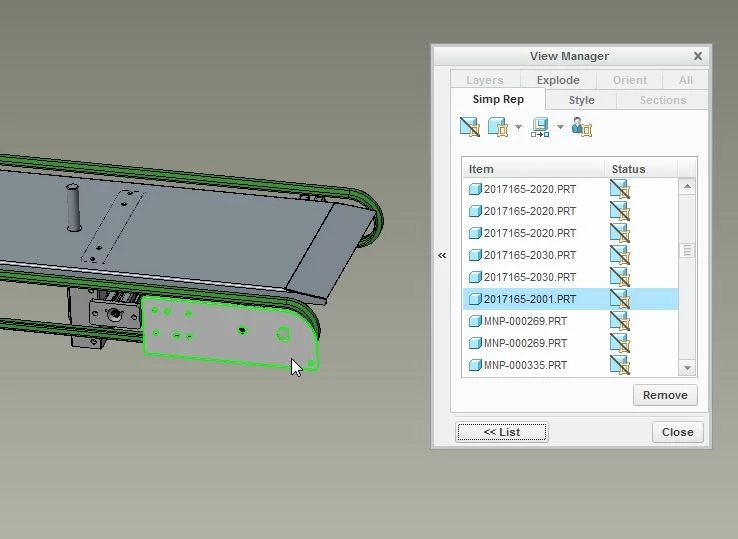
2017-10-19 10_52_51-2017155-0001 (Active) - Creo Parametric.jpg


Does anybody know what the problem might be? We had this problem once with another part, but at that time we were not trying to fix this problem...

3 replies

12-Amethyst
October 19, 2017

do you have any skeletons with copy geoms or shrink-wraps within the assembly? This will show as two parts one on top of each other.

12-Amethyst
October 19, 2017

Hi jbob,

thanks for your reply.

As far as I know, we don't have any skeletons or shrink-wraps.
I've also checked if the part has been assembled twice (on top of each other). But that's not the fact...

8-Gravel
October 26, 2017

hello,

I think that part is in some other subassembly, isn't it???

Pleae check "Redefine" option to that simple representation. Right click to the representation name and redefine option.

You will find a Edit dialogue box with two small windows, ''Model tree and model graphics''.

Click on that part in the model graphics window and see the model tree will be opened up to that part...

Please check options for that part in that model tree, 'Exclude or Exclude derived'

Or If possible please share picture of that Edit dialogue box model tree.

12-Amethyst
October 26, 2017

I've tried this, but 2 parts are still vissible, even when they are on "Exclude":

Exclude 1.jpgExclude 2.jpg


Even a forced regenerate in the model-player isn't giving any solution...

8-Gravel
October 26, 2017

By the picture it should not be appear in the model and drwaing.

But, Please click on that mark in front of the part, so that mark will be gone.

And it will become ''Exclude derive''

hope so it will work

That mark arrow in front of the part has to be gone.

Please try it

See attached picture

Mahesh_Sharma
22-Sapphire I
October 26, 2017

Try creating a new Sim rep and test the issue. For a trial insert this assembly in a new assembly and try creating a new simp rep. Even force regeneration (Regeneration using model player) may help.

If nothing works, submitting a ticket for PTC TS will help.