
1-Visitor
November 6, 2013
Solved

Simulation Diagnostic Warning

  • November 6, 2013
  • 4 replies
  • 2514 views

"X-axis direction of the local beam coordinate system has changed."
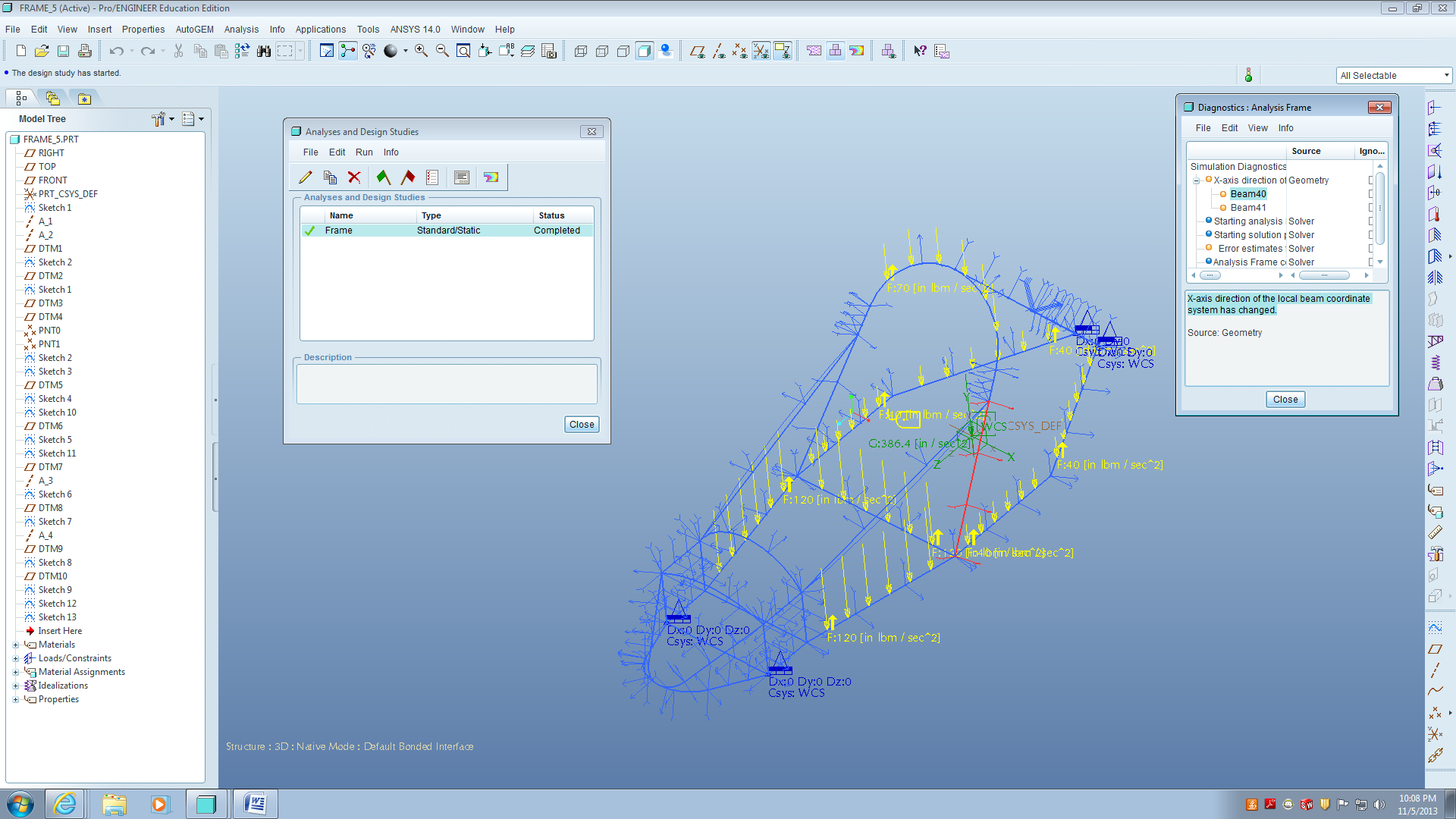
Frame+Design+Warning+Message.png

I continue to get this message, and I don't know how to fix this. Any professional help would be welcomed.

Thanks,

Ali


This thread is inactive and closed by the PTC Community Management Team. If you would like to provide a reply and re-open this thread, please notify the moderator and reference the thread. You may also use "Start a topic" button to ask a new question. Please be sure to include what version of the PTC product you are using so another community member knowledgeable about your version may be able to assist.
Best answer by integrisbrad

Every time that I remember experiencing this, it was because of points were defining the ends of the beams that were really close together, but not actually coincident, and they were getting merged when meshing. I don't know the scale of the model you have pictured, but that may not be a big deal here. A look at the beams in your mesh will tell you if there is a major jump of the beam positions.

The most common situation where I've seen this is when people try to create very large assembly models and create small features. An example would be a large machine-level assembly model with point datum features representing bolted joint or pinned connections. The model accuracy (by default it's a relative number) can be large enough that it doesn't recognize the small distance between the points, and merges them. The tolerance report in Mechanica or Simulate can help with these situations. If the "tolerance value" listed is smaller than the distance between points you want to recognize as individual points in the mesh, then points will likely merge. If you have beams associated with these points, then you will get this x-axis error message as well.

4 replies

1-Visitor
November 6, 2013

Every time that I remember experiencing this, it was because of points were defining the ends of the beams that were really close together, but not actually coincident, and they were getting merged when meshing. I don't know the scale of the model you have pictured, but that may not be a big deal here. A look at the beams in your mesh will tell you if there is a major jump of the beam positions.

The most common situation where I've seen this is when people try to create very large assembly models and create small features. An example would be a large machine-level assembly model with point datum features representing bolted joint or pinned connections. The model accuracy (by default it's a relative number) can be large enough that it doesn't recognize the small distance between the points, and merges them. The tolerance report in Mechanica or Simulate can help with these situations. If the "tolerance value" listed is smaller than the distance between points you want to recognize as individual points in the mesh, then points will likely merge. If you have beams associated with these points, then you will get this x-axis error message as well.

1-Visitor
November 7, 2013

Thank you very much! I was able to fix the model with your help.

1-Visitor
November 7, 2013

Do you know how to fix this problem?

frame_problem.png

15-Moonstone
November 8, 2013

Hello Ali,

You can already watch where free pages, information that could help you.

Cordially.

Denis.

http://www.sdcpublications.com/Textbooks/Introduction-Finite-Element-Analysis-Using/ISBN/978-1-58503-670-7/