

2-Explorer
September 18, 2018
Solved

Sketch feature for everything - it drives me mad

  • September 18, 2018
  • 3 replies
  • 8462 views

Hello community,


 after almost 10 years working with ProEngineer and Creo parametric, l got some standards method of modeling. l´m realy surprised of 3D model quality in my current company. l know Catia, Solidworks, SolidEdge etc. are working some way, but !!! WE ARE USING CREO PARAMETRIC !!! and it has own principes how it works and absolutly don´t care about Catia etc...

What´s drive me mad? See following and tell me honestlly if l´m wrong...

1) use sketch feature everytime before extrude or revolte

2) don´t use Show dimmensions in 2d drawing, instead of this make all dimmensions manulay

3) don´t use tolerance area in dimmensions properties - instead of this use dimmension notes

4) see following picture for better imaginations
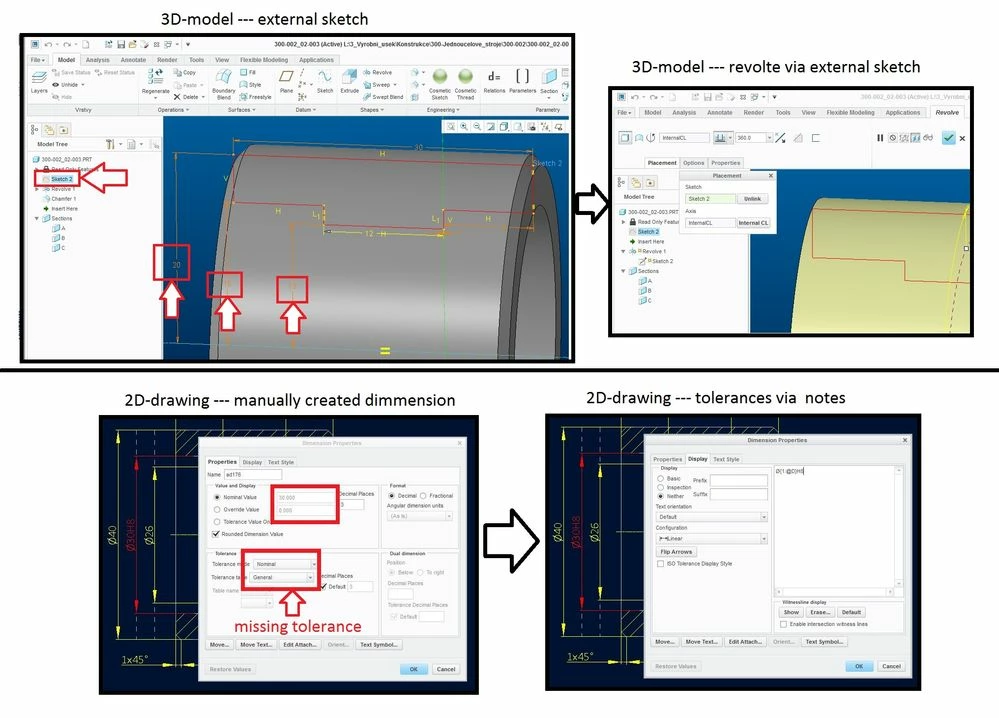
it drives me madit drives me mad

Of course sometimes l need external sketch. But external sketch for everything is absolutly unproductive method of modeling (from my point of view). If you know some meaningful reason for doing external sketches for everything let me know please.


Best regards

@mbonka

Best answer by dgschaefer

Dave,


While the items you highlight as advantages of internal sketches are true, the reality of day to day modeling is that they are almost never needed.  The only exception is reusing a sketch for multiple features and the reality is that while I frequently want to reuse specific sketch (or curve) segments, I don't often need to reuse entire sketches.


There are significant disadvantages to external sketches:


  1. Cluttered model tree. Hiding them through model tree options isn't a good long term solution because it depends on each user's model tree preferences and it makes it difficult to find the sketch when you need to modify it. SW absorbs sketches like this and it's one of the major shortcomings of it's UI.
  2. Potential separation of the feature and the sketch that drives it. It's possible that feature #50 could be driven by sketch feature #5, making it tough to find the sketch when you want to redefine the feature. Not to mention the model might look dramatically different when the feature's sketch is redefined.
  3. Sketch is inaccessible from the feature dashboard. If I redefine the feature, I can see what sketch drives the feature but I cannot redefine it.  I then have to exit the feature dashboard, go find the sketch and redefine it.

These practical disadvantages far outweigh the theoretical flexibility offered in my experience.

3 replies

16-Pearl
October 16, 2018
mbonka2-ExplorerAuthor
2-Explorer
October 17, 2018

Hello @DaveMartin


 thanks for your answer. Didn´t know it´s possible switch external sketch this way. Yes in some casis it can be useful, but main question is:

Do you use external sketch for each extrude or revolte?


Regards

@mbonka

23-Emerald III
October 17, 2018

I never use external sketches for features, BUT, for the past few years, that's the way PTC has been teaching it so you should expect that you will see it more from new users.

You can reuse your sketches but over the past  20+ years I have been using pro/e,I can count the number of times I have reused that exact sketch for more than one feature on one hand. 

You can also "switch" the sketch, I don't remember every needing to do that.

16-Pearl
November 13, 2018

Sorry, I lost track of this thread, but one more argument for External Sketches: Sketch Regions in Creo Parametric 5.0. These are very powerful and are going to simplify the part modeling process. (For people familiar with SW and NX, this functionality will seem familiar.) However, it works only with External Sketches, not Internal Sketches.

https://youtu.be/KjbG0zNSfRM


Patriot_1776
22-Sapphire II
November 14, 2018

I guess I don't see what the issue is.  Unless you're using a free-form modeler, of COURSE you're going to need to sketch a cross section of some kind, that's just how geometry works.


Unless I want a sketch to drive multiple features or parts in an assembly, I always use an INTERNAL sketch.  I always hated SolidQuirks and it's external sketches cluttering up my model tree.  YOU CAN CHANGE FROM INTERNAL SKETCH TO EXTERNAL AND VICE VERSA, SEE BELOW!!!


To me, your complaint is a non-issue because I don't see any way to do it without a sketch of some sort.

21-Topaz II
November 14, 2018

@Patriot_1776 wrote:
... I always hated SolidQuirks and it's external sketches cluttering up my model tree.  ...

The worst about the SW functionality is that sketches are absorbed into the feature and then disappear from the tree.  So, if you have a sketch as feature #9 and then use it for an extrude as feature #100, the sketch is absorbed and you have  no idea where it exists in the tree.  Redefining the sketch inside feature #100 suddenly puts you back at feature #9 and you wonder where the model went.


@Patriot_1776 wrote:

... I DO really like the fact that, now, you can easily move the sketch (and sketching datums etc.) from internal to external and vice versa.  THAT is really nice if you need to completely re-think how you did your model due to unforeseen changes. ...

Wait, so you can now drag sketches in and out of features?  I'm still on Creo 2, when was this change made? With Creo 2 that's possible for datums, but not sketches. That's huge and very welcome, if accurate.

Patriot_1776
22-Sapphire II
November 14, 2018

Sorry, perhaps I misspoke, I just tried it and I can move the "datum-on-the-fly" into and out of the feature, but not the sketch.  I was on a more advanced datecode of creo3 some time ago and could have sworn you could move the sketch too, but maybe I'm 100% wrong.  On the datecode I have (M130) you can only move the datum.  Drat!

-------------------------------------------------------------

Edit:  Disregard everything above.this line.  I was right, just not the way I thought (been off creo for over a year until now).  You can easily drag-n-drop the datum plane.  You CAN switch between using an external sketch or an internal one.  Sketch a feature using an internal sketch.  Then redefine it and under the placement tab where you see the "Sketch" (showing "Internal Section 1") instead pick the prior external sketch.  It then gives a warning about deleting the internal sketch, hit ok.  Hit the green checkmark and you're done.  Want to change it back as an internal sketch?  Redefine it and under the placement tab hit "Unlink", then ok, then hit the checkmark.  Boom!  Done.  So, not quite as easy as moving the datum around, but still easy and WAY handy.