

16-Pearl
August 24, 2017
Question

Smooth Curves

  • August 24, 2017
  • 2 replies
  • 6652 views

I have a sketch section that consists of several segments. I used the copy curve command, with approximate option to create a single segment curve which will be used as trajectory in the subsequent sweep feature. What annoys me is that the resultant curve is not smooth in terms of its curvature as shown below:Capture.JPG
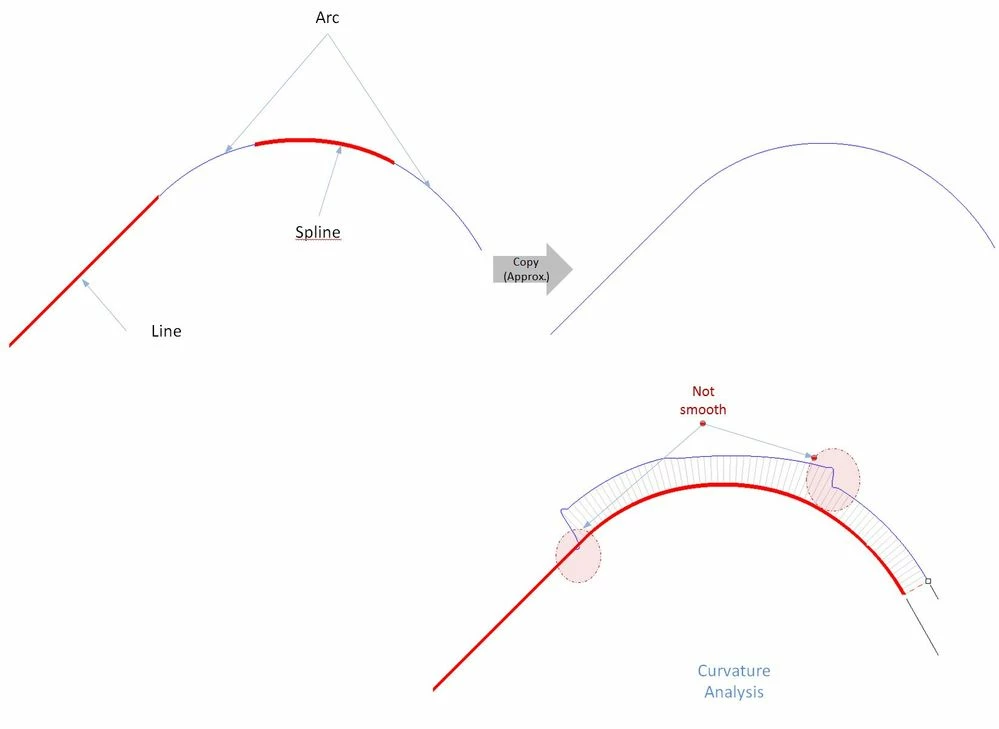


How to smoothen the curve? Thanks


2 replies

1-Visitor
August 24, 2017

Hello,

To make a smooth curvature, you must first ensure that the spline line is tangent to the arcs, then double-click the spline line to open the spline modification tool (or select the spline line right click and click modify), You select the Curvature Analysis Tool option to observe how the spline line is smoothed, then proceed to drag the dots or center points of the spline line until it is smoothed. It is a manual process. I suggest that you better only use arc lines to set sweep.


abustamante

BHOoi16-PearlAuthor
16-Pearl
August 25, 2017

Thanks for the suggestion. I did make them tangent at all intersections.

1-Visitor
August 24, 2017

Well, you can't expect the curvature to be "smooth" if you are connecting an arc to a line... Line has 0 curvature, arc has constant curvature - there will be a discontinuity there and a step in the curvature graph.


I suggest you try to connect your line and arc segments with 2-point spline segments which ends are tangent and curvature continous:

curvatures.png


BHOoi16-PearlAuthor
16-Pearl
August 25, 2017

This is good, it makes the curve smoother . Thanks for the suggestion