
1-Visitor
October 11, 2017
Question

Spline control, curvature continuity, "simple" corner round

  • October 11, 2017
  • 2 replies
  • 6716 views

I am using Creo 4.0 and I just want to make a simple curvature continuous round.  I used to have to do this manually without the advanced surfacing package, but I was glad to see curvature continuous constraints built into Creo 4.  However, with those constraints and tangency constraints, this spline shown IS NOT SYMMETRIC.  I tried to constrain the control points and use a control polygon, but none of it yields a symmetric spline!  What is going on?!  I'm downloading Creo 2 now to see if I can get my simple spline back.
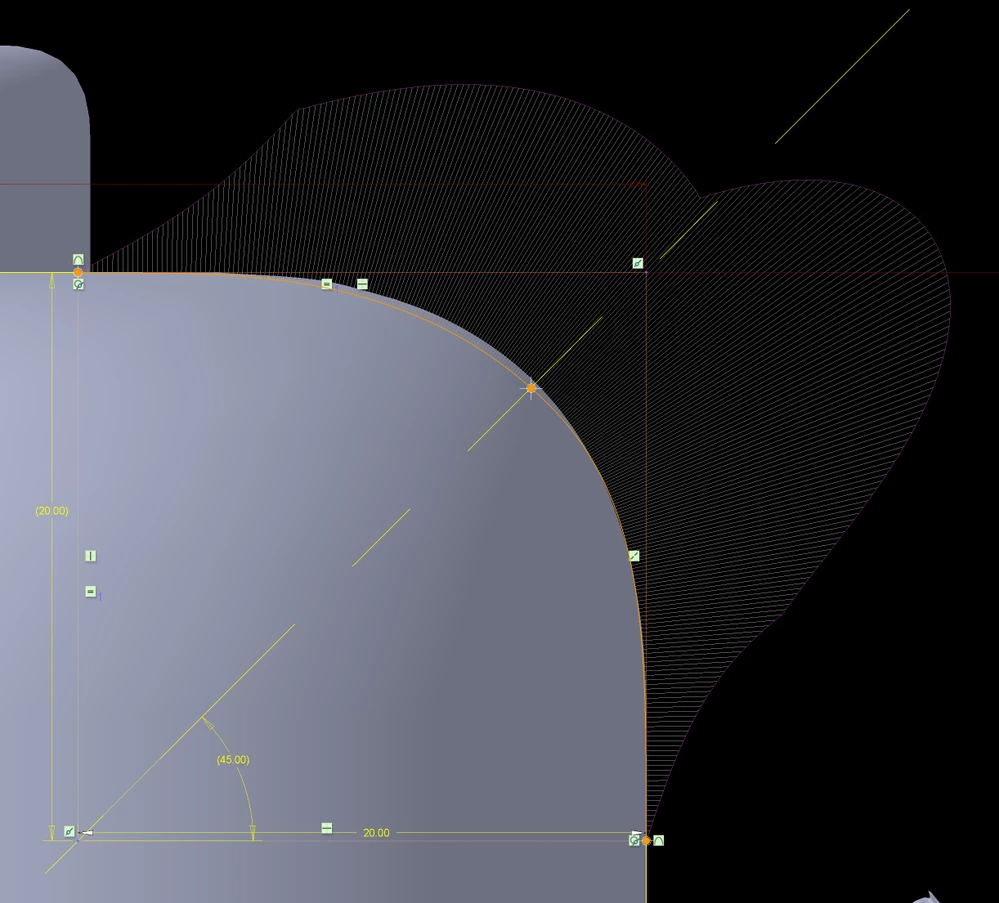
 

"simple" curvature continuous spline round"simple" curvature continuous spline round

2 replies

16-Pearl
October 12, 2017

Hi, I am on Creo 2 and the 2-point spline is symmetrical as shown below:

Capture.PNG

1-Visitor
October 12, 2017

Thx, but I need at least one control point in the middle of the spline to approximate a simple round.

16-Pearl
October 12, 2017

This is with a control point at its mid span:

Capture.PNG


It looks symmterical but actually it is not. I mirrored the cure and it does not overlap exactly to the original one:

Capture2.PNG

17-Peridot
October 14, 2017

Available Curve ControlsAvailable Curve Controls

This is a 3-point curve.  It is not bound tangent, rather it is optionally dimensioned to be tangent.

By doing this, it also gives me access to the curvature dimensions.

And I can fix the center vertex orientation by dimension.


The most problematic thing about curves with 3 points is that you have to know that each end is exactly the same length.  Position along the curve is not managed anywhere that I can find.


My results here are Creo 2.  Somehow I am not holding my breath that anything real was done between Creo 2 and Creo 4 on these antiquated curve features.  Just wanted to show you there are some hidden features!