
12-Amethyst
December 16, 2022
Solved

STP export with Pro /batch - Can you set export application protocol?

  • December 16, 2022
  • 2 replies
  • 7298 views

Hi Everyone.

I am on Creo 8, and have an assembly with family table.

I have created a Pro distributed batch file to export all the family table assemblies to STP format.

Is there a way to get the batch file to read step export profile settings I have set in my config.pro 


What I am trying to have is the STP models to retain the colour schemes I have used in the Creo model.

I can achieve this on an individual family table assembly export model, by save a copy to STP file, and with the selection of the options tab brings up the "step export profile settings" dialog box. By changing the Application protocol to "ap214_is", and saving the profile. This exports the creo model to STP keeping the colour scheme.
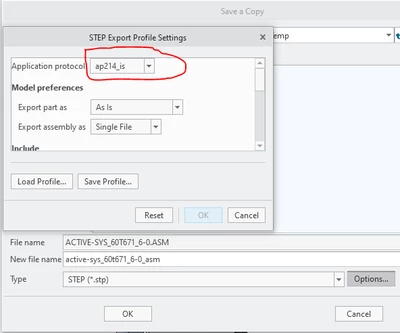
 

Paul6_0-1671190997994.png


I want to be able to batch export to STP using this ap214_is protocol..

Any suggestions on how to do this, would be greatly appreciated.

Best answer by KenFarley

I just checked and it appears step_export_format is a hidden config.pro option. That just means they don't guarantee it will be there in future releases, but you can still use it. It just won't show up for users like us as an option in the options editor. It's a case of if you know it's there, you can set it, but otherwise it's not available. I'm using Creo 9, so it's still there. There are hidden options I've been using since Creo 4 that still work.


PTC seems to do this with a lot of settings. I know about it because I have my editor set up to color all the active options one hue, another hue for hidden options, and a default color for all other text. I got the list of all parameters here:


https://creosite.com/index.php/configuration/config-pro-option-search/complete-lists-of-config-pro-options/


Maybe this is the solution?

2 replies

tbraxton
22-Sapphire II
22-Sapphire II
December 16, 2022

It is possible to save the export settings for STEP to a config.pro file. You can then reuse these settings for export. See the article below for how to set that up. I have not used this with Pro/Batch but it should work.


https://www.ptc.com/en/support/article/CS302035 

Paul612-AmethystAuthor
12-Amethyst
December 16, 2022

Hi, Thanks for your reply.


This is the setup I can use for exporting from the creo app.

However the Pro/Batch STP export function can run without Creo loaded.

Either way when running the step_3d_export.ttd file in Pro / Batch it does not look at the creo config.pro file or the saved export profile..


There is a line in the step_3d_export.ttd file

" <TKFUNC func="ProIntf3DFileWriteWithDefaultProfile">. I wonder were this default profile is kept and whether it can either point to a modified profile or modify the default one to include the ap214_is protocol.

21-Topaz II
December 16, 2022

I looked through all the options available for a config.pro, and none of them seem to allow you to set the type of STEP protocol that is being used. In fact, if you look at this:

STEP help file config options stuff 

there are only two things that can be set via config.pro options, neither of which is helpful in this case.

There is an XML format file I have loaded by my config.pro, specified by:

export_profiles_step c:\ptc\DefaultFiles\export-profile.dep_step

It seems that the parameter in there that sets the protocol to ap214_is looks like:

<profile_options_xar_ SOAP-ENC:Array="[30]">

If you need to have your config.pro settings loaded by the batch execution and they are not, it might be that you need to have a copy of your config.pro in whatever directory you start the batch utility in. This is the kind of behavior Creo itself exhibits, so I'd expect the same from Pro batch.

If this is the case, you might have to copy your config.pro to the directory before executing the Pro batch. You could edit the prodbatch.bat file and add a line to copy your config.pro to the directory it's running in, if you want to make it "foolproof". Or, if you're constantly changing the batch file and don't want to have to edit it, you could create another batch file that copies your config.pro, from wherever you keep it, to the current directory, then run the probatch, etc.

Paul612-AmethystAuthor
12-Amethyst
December 16, 2022

Hi,

Thanks for your suggestions.

I have the config.pro option "export_profiles_step" pointing to my step profile configuration file, it also has <profile_options_xar_ SOAP-ENC:Array="[30]"> parameter included in it.

This config.pro option works great when exporting from the creo app to step file. The default config is ap214_is. 


Copying the config.pro to start-up directory of Pro/batch or copying the pro/ batch to the config.pro directory does not get the step profile read into pro batch utility.


I still think that a modification to the pro/batch "step_3d_export.ttd file" maybe the key to adding the ap214_is configuration. Just not sure how to go about this. 

21-Topaz II
December 16, 2022

This very old discussion implies that the config.pro must be added as one of the "Configuration Files" in the batch setup.

Old Pro Batch Discussion 

Perhaps there is a similar setting in the modern setup?