12-Amethyst
September 16, 2022
Solved

surface model function "Extend" causes single-sided edges preventing a Solidify

  • September 16, 2022
  • 1 reply
  • 1290 views

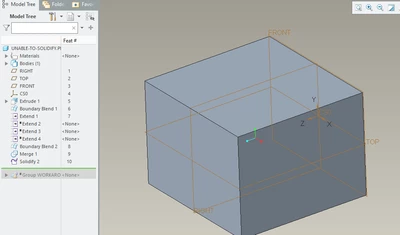
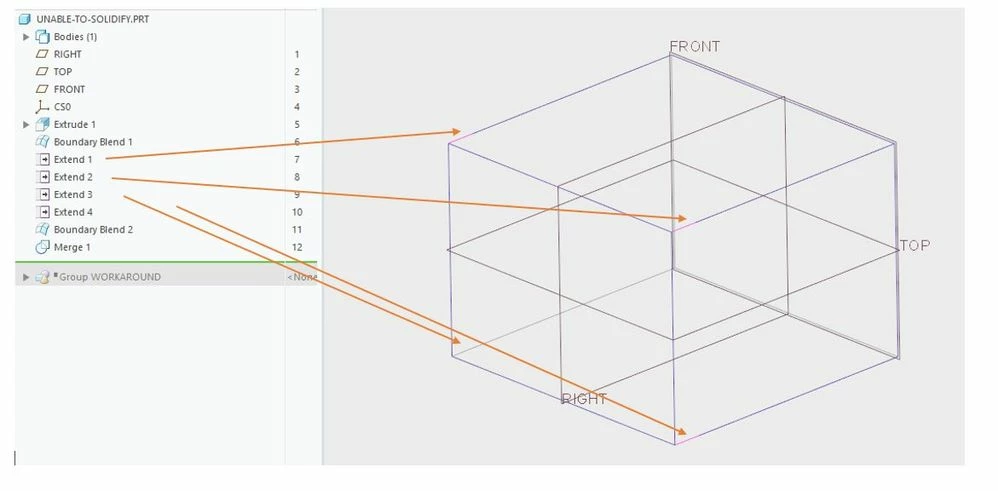
Im unable to solidify this simple box because of the extend function. Ive added some images and the Creo model to clarify. My actual model is more complicated but the problem is the same. Playing around with accuracy (also absolute) does not solve the problem. Im not going to use data doctor because it should be a parametric model.
 

Clipboard01.jpg


I now solve this by creating an offset and creating another offset back to the original size, then I can solidify this second offset but how do I solve this properly? 


Using Creo 70.2.0

Best answer by tbraxton

You have created an open quilt with the extend features. It is not an accuracy problem and IDD is not relevant in this context.


Here is a simple modification to your model (Creo 7) that fully regenerates the desired geometry. Note that the suppressed features are no longer needed.


tbraxton_0-1663333829849.png


1 reply

tbraxton
22-Sapphire II
tbraxton22-Sapphire IIAnswer
22-Sapphire II
September 16, 2022

You have created an open quilt with the extend features. It is not an accuracy problem and IDD is not relevant in this context.


Here is a simple modification to your model (Creo 7) that fully regenerates the desired geometry. Note that the suppressed features are no longer needed.


tbraxton_0-1663333829849.png


kdirth
21-Topaz I
21-Topaz I
September 16, 2022

I have always found it annoying that extending a section of quilt along another portion of the same quilt will not merge the shared boundary.  I think it may be worth an Idea to request the added ability to have that option during and/or after extending.

There is always more to learn.