

10-Marble
November 1, 2017
Solved

Sweep problem

  • November 1, 2017
  • 4 replies
  • 12797 views

Hi All,


I am having trouble creating a sweep from a sketch in Creo 2. I wish to have a 19 mm dia tube follow the sketch path but I cannot seem to make it happen as after I have sketched the diameter and clicked on the green tick a message appears stating 'Feature failed to regenerate'. Any help please? 

I've attached a file to view. I intend to mirror the finished path about the Side datum.
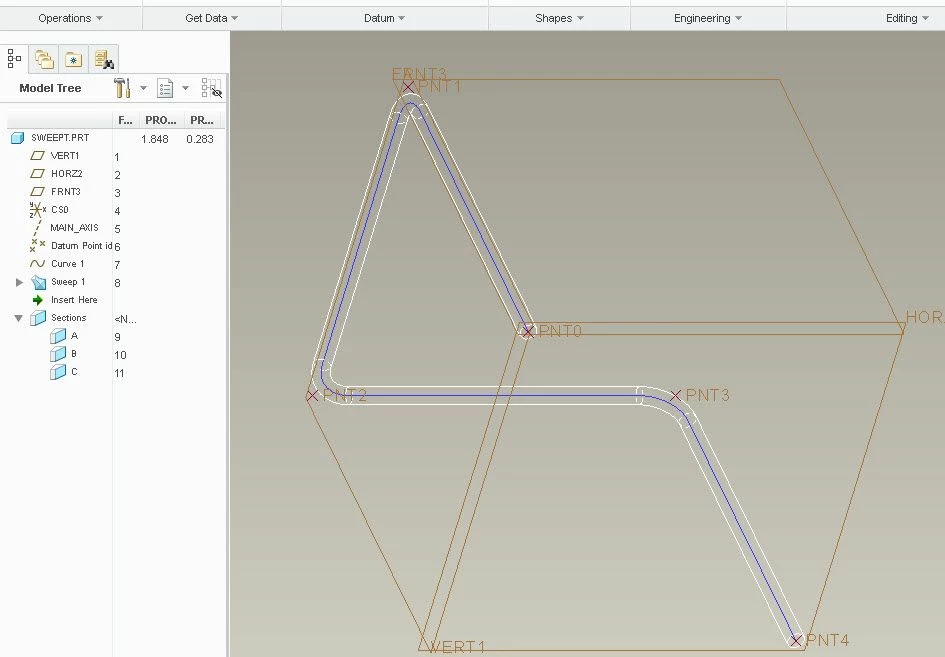
Best answer by StephenW

Create offeset coordinate system points, then create the curve thru points.

Then create the sweep using that curve.


sweep.jpg

4 replies

1-Visitor
November 1, 2017

Typically one makes the sketch at the 0 location along the curve.


I don't know how you selected the trajectory such that the sketch is not at one end or the other, but that's where the sketch has to be.

10-Marble
November 1, 2017

Thanks. I know what you mean. I'm not sure how to achieve this though. The software seems to place the sketch of the tube in a random position. Do you know what I have to do to get the sketch at the end of a sweep line?

StephenW23-Emerald IIIAnswer
23-Emerald III
November 1, 2017

Create offeset coordinate system points, then create the curve thru points.

Then create the sweep using that curve.


sweep.jpg

10-Marble
November 1, 2017

Thanks Guys, you've all been very helpful..

Seems a bit complicated to have to create points though. Why can't a curve just be created by making a sketch line?

Anyway, I have created what I wanted thanks as can be seen in the image. However, because I had to create the points in different planes, the sweep would only travel as far as each sketch was created. Is this normal?

In the end I had to create 2 sweeps, one from each end and then mirror the two to create the finished part. Is there a better way?

23-Emerald III
November 1, 2017

I figured you had multiple sketches to create your overall sketch. That's why your sketch was in the middle.

There are ways to make multiple sketches in to one curve, called a composite curve. I can't remember the details right off hand and is why I typically just make some points to create curves thru points which also gives you the option to add radii to each intersection.

In the end, when I detail the pipe, I end up needing those points locations to dimension to so it makes sense for my process to just do that from the beginning.

With the points, you only need one curve and therefore only one sweep.

Things you will want to learn is to create points offset from coordinate system and also curve thru points (not just 2 points)


24-Ruby III
November 1, 2017

Hi,


create new part and define curve representing sweep trajectory in it. Save part and upload it. Anybody will be able to download your part and create sweep geometry for you.

21-Topaz II
November 1, 2017

How are you selecting the curves?  Since your trajectory isn't planar, you must have several sketches to make up the one trajectory.  My guess is that you are selecting them one by one in the sweep dialog and Creo is treating them as indivdual trajectories instead of one.


When selecting trajectories, holding control adds each selection as a separate trajectory.  You'll see multiple line items in your trajectory list in the dialog box.  That's not what you want, you want them all merged into a single chain. If you hold shift instead of control, Creo builds one chain trajectory out of all of your selections instead of treating them as separate.  Then your sweep should work.