
15-Moonstone
October 20, 2017
Question

Swept Blend Challenge: Can't match customer loft

  • October 20, 2017
  • 12 replies
  • 4224 views

I need to build a progressive model based off of customer geometry which was built in Catia.  The only issue I have is in matching their loft feature.

Here is an example of where my loft doesn't match.SweptBlend.JPG
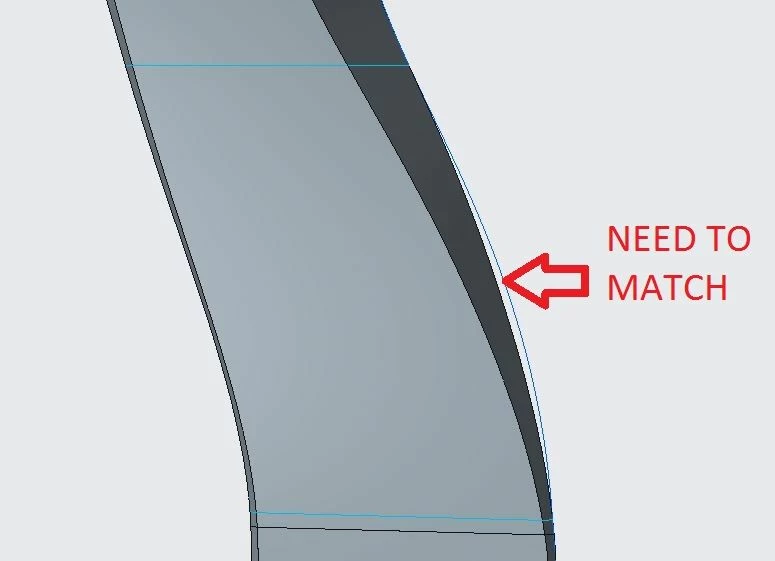
Because of the shading you can't see that the customer driven left curve at the parting intersection falls inside of the loft so it doesn't match up as well.


I can get 1 side to match up correctly by using it as a reference curve, but the other side will never hold position using this reference.


There is the option to add a secondary reference (or trajectory) but this reference never holds tight to the curve.  Ultimately I really would like the secondary reference to be meaningful by laying directly on the needed curve.


I have made a curve based off the centroid of all of the sections but this throws both sides out.


The depth  is off as well as the sides.


I've looked at every option but couldn't find a way to influence the results to match sides and depth.


Perhaps I will need to make this a boundary blend feature, but it really should be possible to match all sides with the Swept Blend.


Before I give up would anyone know the trick to getting a good Swept Blend? 


12 replies

6-Contributor
October 20, 2017

Without model no one can help you, but i'd say to you to try to add more trajectories as referenses and this way shape would be more controled/precise.

pimm15-MoonstoneAuthor
15-Moonstone
October 20, 2017

Unfortunately due to customer propriety I can't provide a model.

With Swept Blend I believe you can only have a primary and secondary trajectory.  If my primary trajectory lies on 1 of the needed curves, unfortunately the secondary will not pull out to match the opposing curve.


In our old software there was a feature called Bi-rail Loft.  That is kind of what I would like to use, but within Swept Blend the secondary reference appears to be of little value.

17-Peridot
October 22, 2017

Use polygon control with dimensions on curves.

These become master intersect sketches.


Without some idea of how the original came about, this is a tough challenge.

In general, there is some controls for surfaces in sweep/blends, but they are finicky as most thing Creo.

If you had some clue as to where control planes were located, you could section the reference and disassociate it with dimensions.  You could even use point references made from IGES files.  Often times, Boundary blend can make for a simple duplication method based on select captured data, not neccessarily the import model.


pimm15-MoonstoneAuthor
15-Moonstone
October 24, 2017

Tom,


Sorry for my slow reply; sometimes work gets in the way.


I can't find the polygon control using dimensions on curves.  Would this option be within Swept Blend?


It does seem that Sweep gives more control to the results, but I am needing to use the customer's sections to develop the shape, and hopefully match any twists.

17-Peridot
October 25, 2017

Sorry for my delay.  I don't get notifications anymore.


I was thinking guide curve sketches for controlling spline curves.


Any chance you can get the original model in the native format?

If the original is parametric, you could see the control features that created the shape.


17-Peridot
October 23, 2017

You could also try adding sections in the area where there is a mismatch...

pimm15-MoonstoneAuthor
15-Moonstone
October 24, 2017

manjunathrv


I have tried adding sections and it does improve the match between customer geometry and my own, but it's not a perfect match.


I am going with these results and their minor imperfections.


I keep thinking that if I could hold the 2 parting rails I could get a perfect match when used in conjunction with known sections.  Unfortunately it appears this just isn't possible.

 
pimm15-MoonstoneAuthor
15-Moonstone
October 24, 2017

By adding extra sections it has stabilized the Swept Blend somewhat.


I still however am seeing variations in between sections that could cause issues in manufacture.


On the left side of the attached picture you can see how this is falling out compared to the original.


I could continue adding sections but at some point I'm thinking that the result will become bumpy.


If it isn't possible to control the result with holding the parting line rails at least it would be nice to influence some directional pull from section edges.

14-Alexandrite
October 25, 2017

Can I ask, if you have a model already, why do you have to duplicate it?


pimm15-MoonstoneAuthor
15-Moonstone
October 25, 2017

Inoram:


Sure, the reason we need to do this is that we need a size for size template and from that template we need to add draft and radii for different pre-forming impressions.


A pre-forming impression needs to fall inside the next impression, the following impression and finally the customer model impression.  That is why I need to start with a very close representation of the customer model.