1-Visitor
December 17, 2017
Question

Swept blend - how to create project outside profile.

  • December 17, 2017
  • 2 replies
  • 2457 views

Hi All,


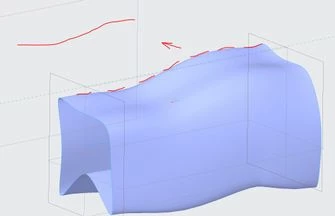
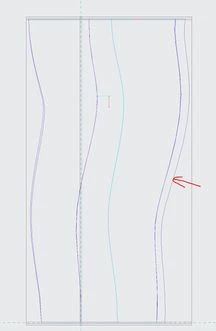
I'm trying to create projected line from outside profile of "swept blend" on plane (as shown on attached 2nd picture) but i'm not able to select silhouette edges while i'm trying to define "projected operation" ( pointed by red arrow on 1st picture).


Much appreciated for your help,

Damian
edge.JPG

3d.JPG

2 replies

17-Peridot
December 18, 2017

Try creating a sketch of the silhouette using the project in the sketcher.

Project this new sketch instead of the silhouette.

Setting up the sketch is obviously normal to the projection direction.

Note the obvious limitations this adds to advanced projection techniques.

But normal projection onto flat planes, this will work for you. 

Also note that silhouettes tend to be fleeting (vulnerable to instability) when the model changes.

1-Visitor
December 18, 2017

Is this during sketch creation? If you are trying to skip making a sketch you will not be including the projection direction which is required to understand the direction the silhouette is being evaluated.


See http://support.ptc.com/help/creo/creo_dma/usascii/index.html#page/dma%2Fdirect_modeling%2Fexample_silhouette_edges_of_faces.html%23


(Edited after: Eventually there will be a system to notify that another reply is in progress.)

17-Peridot
December 18, 2017

🙂