

Swept blend on a closed curve loop
Hi,
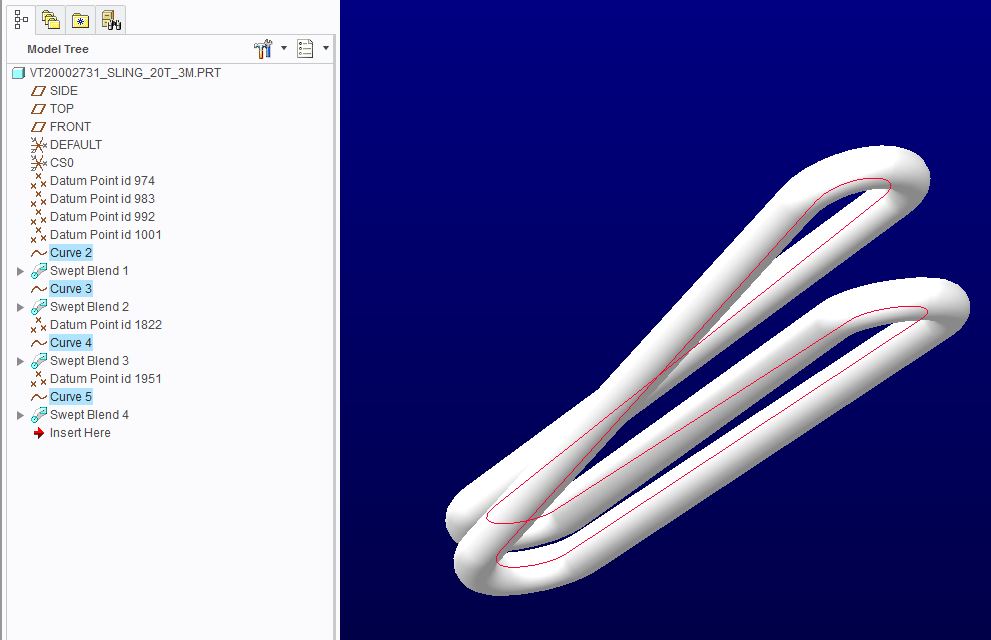
I am looking for a way to create a model of a lifting sling in a U-hitch where the axis of the attachments in the top and bottom are parallel. This configuration causes the sling to twist as seen below. If you want to visualise it you can try and simulate it with a rubber band and your two index fingers.
I am sure that I could create it by using the pipe feature, which has no icon, but can be found by typing 'pipe' in the search field. I am using Creo 2.0 M130.
The model below is a bit of a mess and I only managed to do it by creating four datum curves and four swept blends. As you can see I have made the section run along the outside of the datum curve in order to check that the model matches the EWL (Effective Working Length) of the actual sling. This is quite important in order to control the complete lifting tool's position in relation to the CoG (Centre of Gravity) so that the riggers can adjust the lifting tool correctly.
I have tried to create a new set of datum curves where the points in the top and bottom are laid out in respect to two different coordinate systems so that (ideally) a new sling could be created just by adjusting the distance between the coordinate systems. This curve can be found in the attached model. The attached model will not accept a swept blend apart from PNT0 to PNT2. Then it fails to regenerate.
Is there anyone out there who has some valuable input? It will be mucha appreciated.
/Niels
This thread is inactive and closed by the PTC Community Management Team. If you would like to provide a reply and re-open this thread, please notify the moderator and reference the thread. You may also use "Start a topic" button to ask a new question. Please be sure to include what version of the PTC product you are using so another community member knowledgeable about your version may be able to assist.