tbraxton
22-Sapphire II
22-Sapphire II
October 31, 2024
Solved

Table pattern failing: how to find the issue

  • October 31, 2024
  • 2 replies
  • 2256 views

Creo Parametric 7

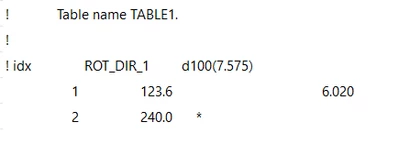
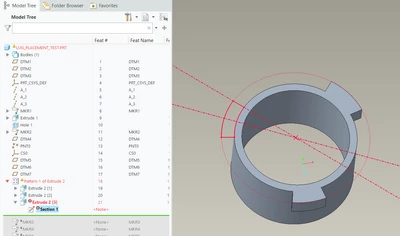
I have a table pattern with 3 members, the third member is failing but I have not been able to root cause the failure. The pattern regenerates when only varying the angle dimension (ROT DIR 1), when I add the linear dimension to the pattern it is failing.


I am looking for options on how to determine what is wrong. If anyone has suggestions for diagnostics or can see the issue, chime in.

tbraxton_1-1730332657996.png


Creo 7 model posted for review.


tbraxton_0-1730332410326.png


Best answer by tbraxton

It appears that @Patriot_1776 may be correct about the curse of the split circles contributing to this.


This is the explanation I got back from R&D on why the intent chain is failing and the edge is not. In this case intent chain for the full circle is not more robust than using an edge of the same arc.


“Section of the first pattern feature uses Intent Chain as a reference.

When the first instance is regenerated, this intent chain forms a circle - fine. But this extrude modifies the edge that this intent chain is based on.

When the second pattern instance gets regenerated, the intent chain is an arc - still fine. But this extrude breaks this arc into two and now the intent chain contains three arcs.

The third instance sees three arcs in the intent chain and fails to regenerate as Sketcher doesn't support projections of intent chains with multiple components.

This is the expected behavior.

Users can easily modify the section so that it doesn't use intent chain reference but just uses an edge (which is used anyway, in that sense the intent chain is redundant in the original model).”


2 replies

tbraxton
22-Sapphire II
tbraxton22-Sapphire IIAuthor
22-Sapphire II
October 31, 2024

The table pattern regenerates until modifying the second dimension (lug width). See enclosed video which was shot using Creo 9 to verify the issue is not unique to Creo 7.

kdirth
21-Topaz I
21-Topaz I
October 31, 2024

There appears to be something in your model or in how you modeled it that is causing an issue.  I cannot get your file to work, but starting from scratch I can get it to work in 7.0.

There is always more to learn.
tbraxton
22-Sapphire II
tbraxton22-Sapphire IIAuthor
22-Sapphire II
October 31, 2024

@kdirth I can confirm your observations in Creo 7. Did you create a table pattern and manually edit the table to create the 3 lugs? I converted an axial pattern of the lugs to a table pattern and then modified the table and added a dimension to the table which may be the difference.

tbraxton
22-Sapphire II
tbraxton22-Sapphire IIAuthor
22-Sapphire II
October 31, 2024

A workaround exists. Changing the pattern regeneration option to variable results in success with the pattern. This however I think is a bug as the "general" regeneration option is a more permissible domain for regeneration, variable is a subset of general. This looks like a bug to me. Thoughts on this quirk? Same behavior in Creo 7 and 9.


tbraxton_0-1730380193258.png