
1-Visitor
September 23, 2013
Solved

text display different in format drawing and PDF

  • September 23, 2013
  • 1 reply
  • 2281 views

I am converting old wildfire border formats into creo 2.0 for drawings, but most text show small in print out PDF. I increase font size that shown out box in format and out of control in PDF.


This thread is inactive and closed by the PTC Community Management Team. If you would like to provide a reply and re-open this thread, please notify the moderator and reference the thread. You may also use "Start a topic" button to ask a new question. Please be sure to include what version of the PTC product you are using so another community member knowledgeable about your version may be able to assist.
Best answer by JamesBurcham

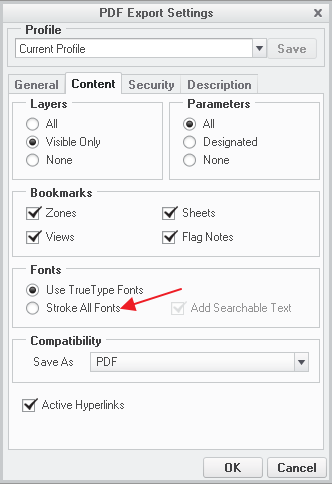
When saving the PDF try selecting the stroke all fonts option on the content tab. Or you can use the config.pro setting "intf2d_out_stroke_text" set to "all".fonts.png

1 reply

1-Visitor
September 23, 2013

When saving the PDF try selecting the stroke all fonts option on the content tab. Or you can use the config.pro setting "intf2d_out_stroke_text" set to "all".fonts.png

24-Ruby III
September 24, 2013

Hi,

if formats/drawings contain TrueType fonts in texts, then set Use TrueType Fonts option.

If formats/drawings contain ProE fonts in texts, then set Stroke All Fonts option (in this case you have to set pentable properly).

Martin Hanak

jzhang-31-VisitorAuthor
1-Visitor
September 24, 2013

Thanks a lot, I will be careful to use "Save As > Quick PDF" .