

Question
text question and oddities
first:
is there a way to insert superscript characters in a note? The special character palette doesn't seem to have any.
second:
we export the drawings into autocad (using autocad LT/2009).
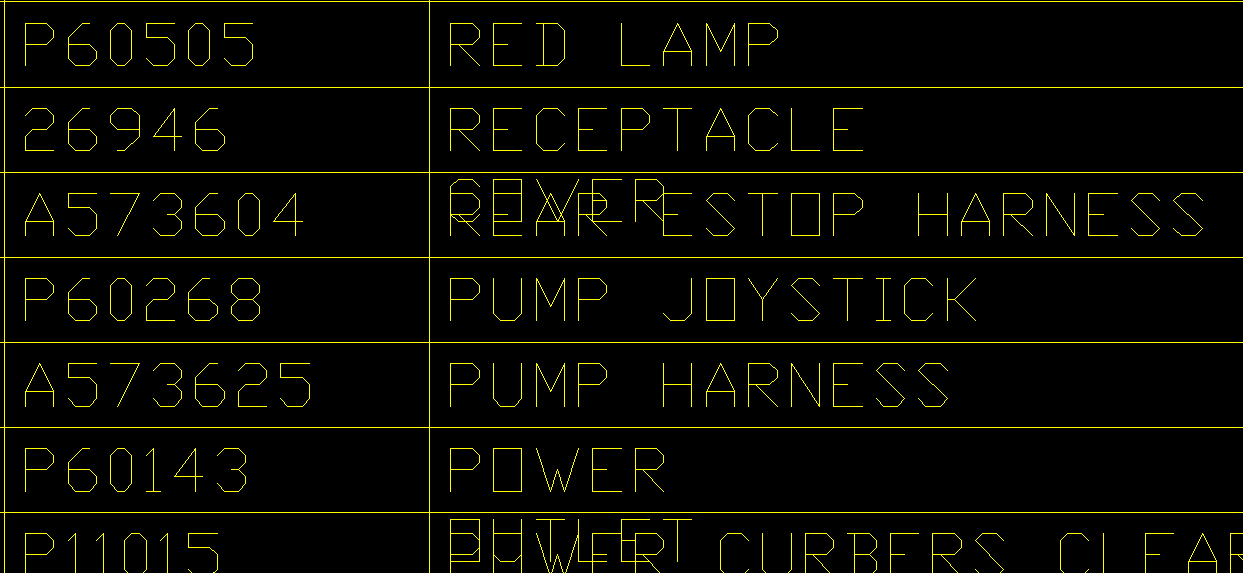
in some bills, the text is shortened and stacked, with the stacked portion appearing over the item below it. this behavior is random. sometimes long text is modified, sometimes short text is. only appears when the export is done, not on the original creo drawing. the text appears as Mtext in Autocad. creo is set to dwg_export_format is 14,intf2d_out_stroke_text is none,
this only happens when the drawing is exported to autocad. no issues when exported to pdf.
This thread is inactive and closed by the PTC Community Management Team. If you would like to provide a reply and re-open this thread, please notify the moderator and reference the thread. You may also use "Start a topic" button to ask a new question. Please be sure to include what version of the PTC product you are using so another community member knowledgeable about your version may be able to assist.