

Thicken surfaces. Issues with making 2 thickend surfaces line up with eachother.
Hi!
I am working on a school project where we are using surface modeling to create a hair dryer suitable for injection molding (We are and have to work in Creo 4.0, just fyi). I decided to go for a more advanced modeling method where I make a boundary blend towards a projection on a complex "pane"/surface (as can be seen in image below).
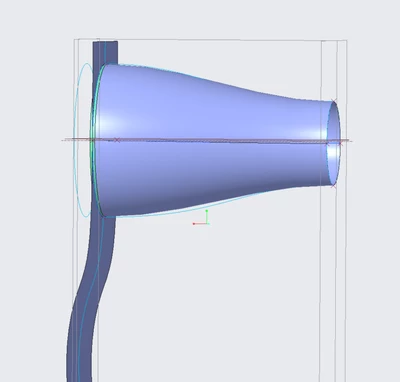
I use a ribbon as a tangent for the boundary blend, I create the ribbon with sketches and curves. The splines in the sketches are tangent to a horizontal center line, while the curves are tangent to axis that are perpendicular to the vertical plane. I do the same for the for the handle (see below).
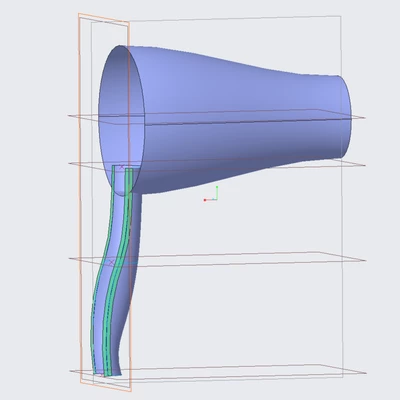
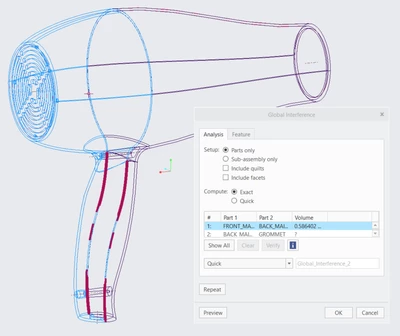
I then merge and thicken this. I use the top-down approach to make the back half referencing the relevant points of the front half. Lastly to my point and my issue, the thicken (even tough all boundary blends uses tangency to ribbons that where created with sketches and curves that are constrained in such a manner that they are perpendicular to the vertical plane) is not created evenly and tangentially which leads to the front and back half interfering with each other (as can be seen bellow).
I have tried a lot of different things but am on the edge of giving up on using a complex splitting "plane"/surface and simply going with a simple straight one instead. This is my last ditch effort to see if anybody knows how to solve this.
(Files attached below)
Thanks!