
5-Regular Member
June 2, 2026
Question

Thread visualization for partly threaded holes

  • June 2, 2026
  • 3 replies
  • 33 views

Hello everyone,

I have a question regarding the representation of partial threads in Creo Parametric. There, only a single surface is created for the thread surface together with the hole, which makes it impossible to colour the surface of the thread. We use the following creation method for a partial thread:
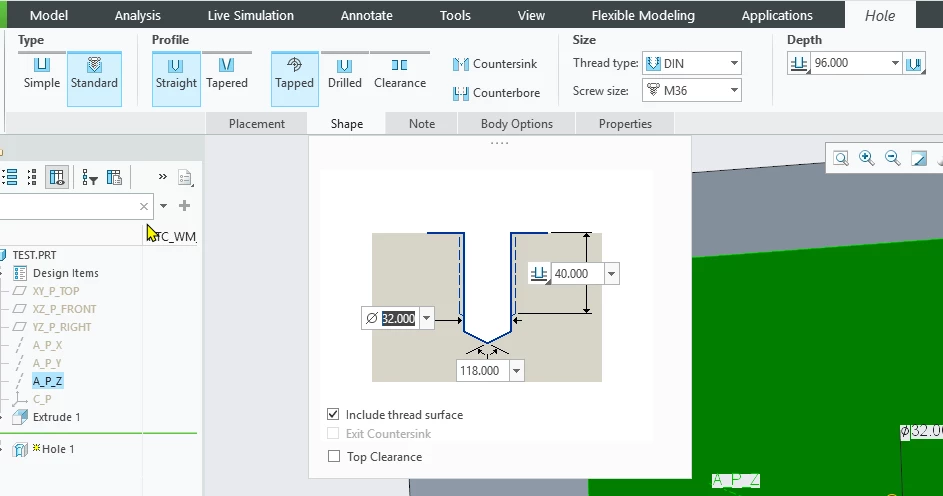
We like to use colouring to visually show how deep the threads should be cut.

Do you have any tips and tricks for this, or is this not an issue for you?
3 replies

23-Emerald III
June 2, 2026

I think this is similar to a request in the IDEAS area but I’m not sure if it is the same request or if a comment under it is the same:


I understand what you are asking for but it is not part of creo’s out of the box functionality.

This is not a problem for us but I can see the usefulness for the visualization verification.

kdirth
21-Topaz I
21-Topaz I
June 2, 2026

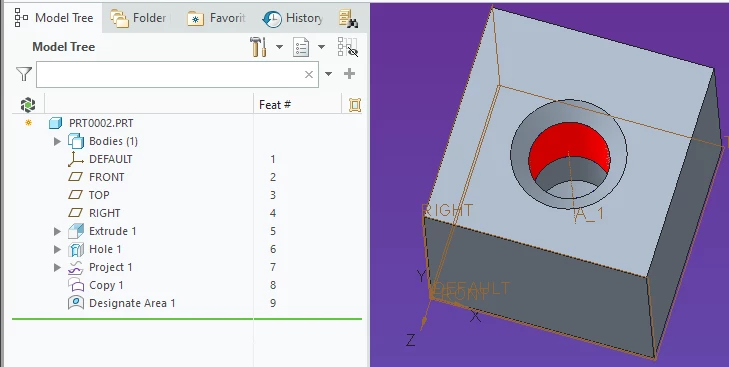
Not an elegant solution, but you can use Designate to paint the appropriate area.

  • Project the bottom of the cosmetic thread.
  • Copy the top edge of the hole.
  • Create a designated surface area using the bounding curves created.
  • Apply color to the designated surface.


There is always more to learn.
5-Regular Member
June 2, 2026

So what I noticed now is that Creo is creating invisible, but selectable edges with the creation of a tapped partially threaded hole:
 

So I used these edges to divide my cylindrical surface:

This works, but is a really complex way...