


Tweak curve through points with curvature continuous ends doesn't work
I'm using a datum curve through points in Creo 5. When making a curvature continuous corner between two straight sides, what I want to do is to only have the two endpoints define the curve and then adjust the "poles" (control polygon points). This would allow me to make the curve more or less "peaky" and to adjust the relative tangency influence of each end. My understanding is that curvature continuity is maintained so long as the two poles adjacent to a side are co-linear with that side. The poles should be free to move as indicated:
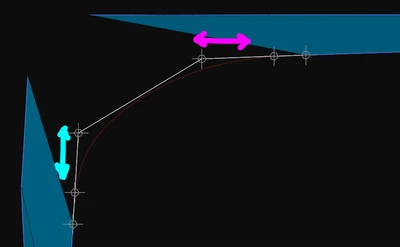
But the interface does not let you do it. According to this support article, you have to add another point to the curve. That is unacceptable -- it increases the "order" of the curve unnecessarily.
I know that on a Style curve with you can change the tangency influence at each close point curve connection. It means entering an influence length number. That said, you can't see the control polygon, so the process seems kind of blind.
Also, using a Round feature set to C2, it lets you change the overall peakiness with a single number.
Why not on a datum curve? Can you add either functionality to Creo?