
4-Participant
June 3, 2024
Solved

Unable to extrude projected sketch

  • June 3, 2024
  • 4 replies
  • 4414 views

Hello, I have a projected sketch that is on a flat surface parallel to the original sketch. However, when I use the extrude command I am unable to use my projected sketch as a sketch to extrude. Is there some trick to using projected sketches? It appears as if it's just a normal sketch but won't let me do anything with it.

Best answer by tbraxton

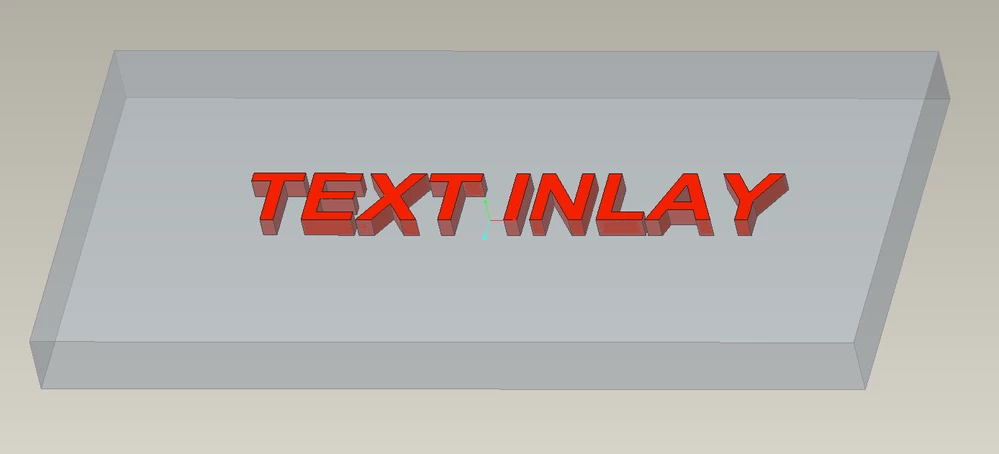
This is one method to create the geometry using multi-body functionality. It is very efficient, and no projection of the sketch required. See the enclosed assembly and parts. This is all driven from the master model "mb_master.prt". Creo 7 models enclosed. All changes to the text and the plate can be driven from the master model.


tbraxton_0-1717548419429.png


4 replies

Dale_Rosema
23-Emerald III
June 3, 2024

It would be helpful for trouble shooting if you could take a screen shot of your sketch.

What version software are you using? Any other pertinent details that might help us help you.

bterry274-ParticipantAuthor
4-Participant
June 3, 2024

I am using Creo 7.0.9.0


I come from SolidWorks and this is how I handle this kind of situation so please let me know if I should go about a different method within Creo.


I am 3d printing a multi color object which requires a multi bodied part. What I do is create my 'base' part with cut extruded text, then create an assembly and then assemble my 'base' part. I will then create a 'text' part but don't create any features. I assemble the 'text' part in my assembly. Within my assembly I will activate my 'text' piece and project the text sketch from the 'base' part, then extrude in the text. This gives me two parts to export as an stl and then print with multi colors.


However, in Creo I can either use the loop project command within in my sketch command and select each character 1 at a time (super time consuming when you have lots of text) or I can create a projected sketch. But the projected sketch does not allow me to create an extrude.


I can't screenshot what I am actually working on but here is a simplified version of what I am trying to do:

test project sketch.png

I need to fill in the words 'test'. You can see I created a projected sketch under test-piece-2 (based off the sketch on test-piece-1). It just won't let me extrude it.

tbraxton
22-Sapphire II
June 3, 2024

You can do all of this in one multibody part and use a Boolean subtract to get the text cut out in the base part. You can then export the two bodies as parts and assemble them if needed. 


Take a look at some examples in this thread where they are building multi body colored logos.

Re: Creo Parametric Community Challenge 6 – Sketch... - PTC Community

StephenW
23-Emerald III
June 3, 2024

I just did a simple test (creo 6). I sketched a random shape and then projected it to another parallel surface. I am not able to use that projected sketch directly to create a cut or extrude from.

Depending on your specifics, you can create a sketch on the desired plane and use project from within the sketch command.


15-Moonstone
June 4, 2024

Hi,
if you project a sketch the result is a projected curve but no longer a sketch.
Sketch-based features only accept sketches as an input.
What you can do is to create a new sketch in the other part ans inside the sketch 'grab' the sketched lines of the original sketch via the sketcher function 'project' with the option 'loop' for ech letter.
This sketch can then be extruded and will follow any modification in the original sketch.

Constantin_0-1717486312402.png


bterry274-ParticipantAuthor
4-Participant
June 4, 2024

What's the point of a projected sketch if it's not even a sketch?


I do know about the loop command under project. However, that allows you to loop 1 character at a time. If I have 100 characters to project that is going to take quite some time and be quite annoying. Especially when I already have a controlling sketch with all those characters in it.

tbraxton
tbraxton22-Sapphire IIAnswer
22-Sapphire II
June 5, 2024

This is one method to create the geometry using multi-body functionality. It is very efficient, and no projection of the sketch required. See the enclosed assembly and parts. This is all driven from the master model "mb_master.prt". Creo 7 models enclosed. All changes to the text and the plate can be driven from the master model.


tbraxton_0-1717548419429.png


bterry274-ParticipantAuthor
4-Participant
June 5, 2024

This is very helpful, thank you.