
1-Visitor
October 7, 2016
Question

Unable to open Mechanism

  • October 7, 2016
  • 19 replies
  • 8272 views

Hi!

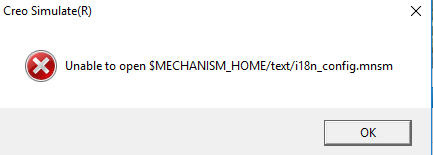
I want to a mechanism in an assembly, but Creo Parametric 2.0 alweys closes with an error massage: Unable to open $MECHANISM_HOME/text/i18n_config.mnsm

Bellow there is a photo of the massage:
fgh.PNG

Somehow i shoud solve this problem, please give me a hand with this.

P. Andras

19 replies

4-Participant
October 14, 2016

Can you please share your system through Team Viewer ?

I can help you online....

1-Visitor
March 1, 2017

hello

can you help me , i have the same message

Thanks a lot

Capture.PNG

24-Ruby III
March 1, 2017

Hi,

can you find following files ?

MH

1-Visitor
March 1, 2017

yes i have it

see picture

1.PNG

24-Ruby III
March 2, 2017

Hi,

so ... the file reported in error message is present .

I do not understand why window title contains text Creo Simulate (R). Please describe what action are you doing in CR2 M220 64-bit.

INFO:

Some CR2 functionality needs Creo Platform agent (starting from M210 maintenance release). Unfortunatelly, this software is not installed automatically during Creo installation. Installation package creoagent_32_64.msi is located in C:\01-PTC_App\Créo_2.0\Creo 2.0\Common Files\M220\install\addon directory. Install Creo Platform agent into C:\01-PTC_App\Créo_2.0 directory. Installation will create Creo\Platform\2.48 sub-directory. Then test problematic action.

Good luck

MH

1-Visitor
March 2, 2017

Hello


Hello  Martin


I install the   Creo Platform agent into C:\01-PTC_App\Créo_2.0  ,  but  i have the same message. Is not ok


Can you help me please

2.PNG