
1-Visitor
November 25, 2015
Solved

Unassociated drawing view

  • November 25, 2015
  • 6 replies
  • 2975 views

Hi all,

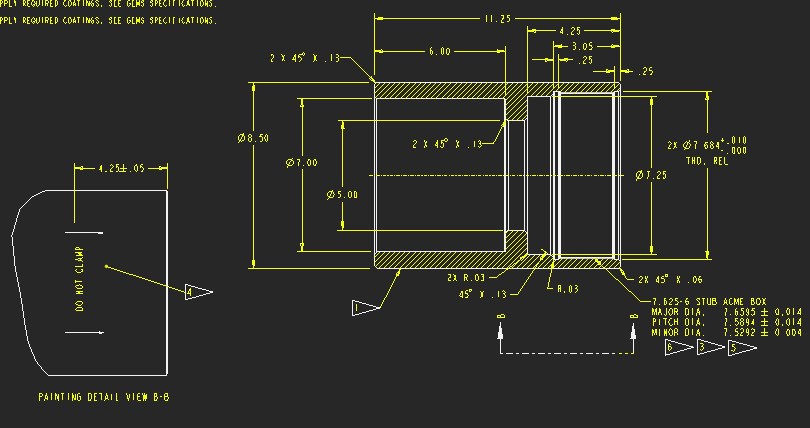
In the screenshot attached, my issue is with "detail view" B. This is actually a completely independent partial view of the bottom face of the part. The section style arrows under the main view have been sketched in. I have inherited the drawing and others like it and am wondering if this is the best can be done?

This is assuming the is no room to simply have a partial projection view underneath. I just don't like the idea that these items an be moved / changed with no consequence.

Any help much appreciated!unassociatd view.jpg 

This thread is inactive and closed by the PTC Community Management Team. If you would like to provide a reply and re-open this thread, please notify the moderator and reference the thread. You may also use "Start a topic" button to ask a new question. Please be sure to include what version of the PTC product you are using so another community member knowledgeable about your version may be able to assist.
Best answer by StephenW

The way I create those exact views are to create a cross section at a distance outside of the part (named B in your case).

I create a bottom projected view from the view shown, add section B to it and show the arrows for that x-section.

I then change the view to be a general view (instead of projection view).

I can then move the view anywhere I want, it maintains the section arrows.

6 replies

12-Amethyst
November 25, 2015

Sorry, I'm a little lost as to what you are trying to accomplish here with this drawing you've inherited... could you clarify?

dhanley1-VisitorAuthor
1-Visitor
November 25, 2015

If there is no room to have a projected view where it should be, is there anything can be done to have it elsewhere but still associated? Then same thing with the section arrows. Is there anything Creo would automatically put in instead of sketching yourself?

I don't know if that's any more useful, thanks.

StephenW
StephenW23-Emerald IIIAnswer
23-Emerald III
November 25, 2015

The way I create those exact views are to create a cross section at a distance outside of the part (named B in your case).

I create a bottom projected view from the view shown, add section B to it and show the arrows for that x-section.

I then change the view to be a general view (instead of projection view).

I can then move the view anywhere I want, it maintains the section arrows.