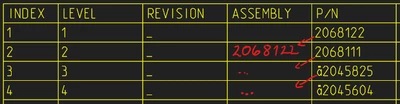
I did it with a Repeat Relation.
As far I see PTC will do a Depth-first search. And this is only one solution I guess..
You must have rpt.level and asm.mbr.name in your repeat region, else you don't have access to the corresponding vars.
The relation will be evaluated not recursively in Creo with a new stack, so the var values will be keept during this while/for Loop.
In Level 1 your Parent is empty "" and you save the name in lev1.
In Level 2 your Parent is lev1 and you save in lev2 the name
In Level 3 your Parent is lev2 and you save in lev3 the name
... and so on
You must have this for the amount of levels you expect.
PARENT is a Repeat Relation Var -> rpt.rel.parent, and must be added.

Here this example stops at Level 4, Level > 4 will set a static text, to force a relation edit.
I kept the relation easy to maintain, no "else"
if rpt_level == 1
 parent=""
 lev1=asm_mbr_name
endif

if rpt_level == 2
 parent= lev1
 lev2=asm_mbr_name
endif

if rpt_level == 3
 parent= lev2
 lev3 =asm_mbr_name
endif

if rpt_level == 4
 parent= lev3
 lev4 =asm_mbr_name
endif

if rpt_level > 4
 parent= "Please Extend Relation"
endif
Vars Init
Here you will only initialize a var if not already exists.
if !exists ("lev1")
lev1=""
endif
You can prepend this, for each level, to be sure each level has a value.
But PTC will walk from 1 to 2 to 3 to ...
This may not needed.
The example table is attached.