14-Alexandrite
February 12, 2015
Solved

VARIABLE TEXT IN CUSTOM SYMBOL

  • February 12, 2015
  • 8 replies
  • 24653 views

Hello,

i have a question about custom symbol. is it possible to have a single variable text repeated?

for instance, i have to use a text in both italian and english language but i have to use the same variable text

ex. ZINC PLATE \ZINC\ AND ZINCATURA \ZINC\

Thanks!

Best answer by BrianMartin

Hi Tom...

I just did the same test and had no problems whatsoever.

  1. Created a new drawing with NO MODEL, no template, no format. This is a completely empty drawing with no parameters
  2. Created one single drawing parameter called myparam set as a string with the characters "XXX" as the value.
  3. Created a brand new symbol, added a circle (just so it had some shape to it) and a note. For the note, I entered "\my_text\".
  4. Under attributes for the symbol, I specified a free point as the location.
  5. Under the Var Text tab, I replaced the preset value of my_text with the string "&myparam".
  6. Saved and exited the symbol creator.
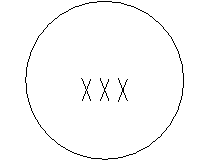
  7. Placed the new symbol on my drawing... and it shows up as a circle with "XXX" in the middle of it.

Here's the symbol in the symbol editor...
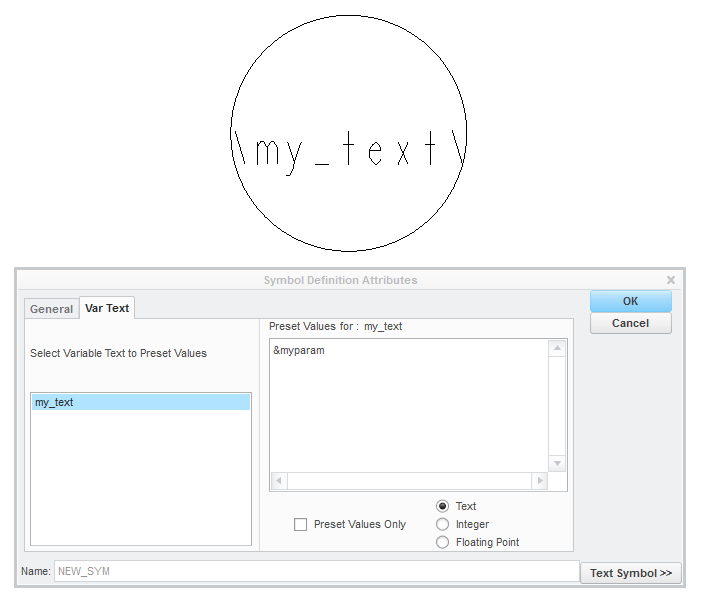
final1.PNG

Here's the symbol on the sheet...

final2.PNG

Here's the entire set of Drawing Parameters...
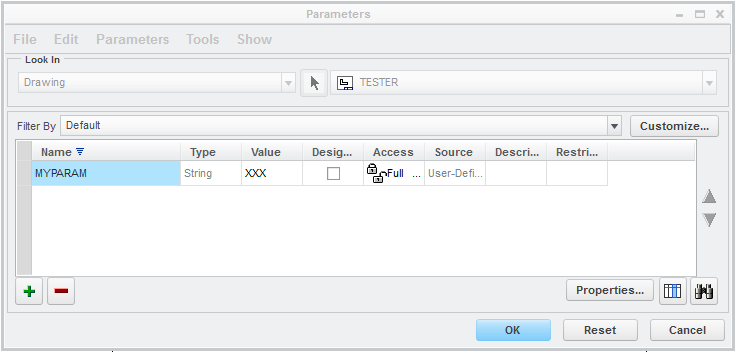
final3.PNG

This is Creo 2.0 M080 which, I think we all can agree, is a terrible build code to use... but this is what I used for this demo.

Thanks!

-Brian

8 replies

Patriot_1776
22-Sapphire II
February 12, 2015

Try it and see, the best way to learn

10-Marble
February 25, 2015

Hello,

I have the same question, I tried a lot of time and I found no solution.

I opened a call, I give you the answer if I have one!

10-Marble
February 27, 2015

You can type whatever you want if you use this syntax in a symbol definition

Define the symbol and add \ in front and back of the note

For example

\Zinc\

When you place the symbol in the drawing you ll see only Zinc.

But you can edit these how much time you want in the drawing and you can place it how much times you want

Hope i gave what you need!

If not please more specific what you need

10-Marble
February 27, 2015

I give you an example of symbol below.

The first line is in Portuguese and the second in English but "codigo" has to be the same value (1 attribute)attribute.jpg

In symbol definition I wrote :

attribute2.jpg

But in that case I have to enter a value for each attribute and potentially I will have a different value.

Thanks for your answers.

10-Marble
February 27, 2015

I dunno whether this is the answer but lets try

you can use parameters right? parameters in dwg

only thing is to you have to designate it and you are good to go... you can use it wherever you want... just one time edit you ll get the value changed wherever you want

Untitled.png

thats all... you ll have to use this parameter in the note wherever you want like this

&PARAMETER_1

Applying it to your case

DEMAIS DIM. VER PECA ESPELHADA: &PARAMETER_1

FOR MORE DIM. SEE MIRROR PA RT: &PARAMETER_1

Hope this solves..

Mahesh_Sharma
22-Sapphire I
March 13, 2015

Christian,

When creating a symbol you can add parameter (&parameter_name) as variable value for variable text to call the value of parameter from part. This will call the value of parameter from part in symbol e.g. if parameter in part is material with value as zinc, symbol will call zinc from part parameter.

If you will define the variable text in symbol without parameter, it will independent for both of the in symbol for input.

10-Marble
March 30, 2015

Hello

10-Marble
March 30, 2015

I opened a call by PTC and that's the answer :

Désolé, je dois vous communiquer que cette fonctionnalité n’existe pas en Creo Parametric

In English : Sorry, I have to answer that this fonctionality is not existing in CREO Parametric.

13-Aquamarine
March 30, 2015

Hi Vincent...

This is not an answer, is it? "Sorry, I have to answer that this functionality is not existing in CREO Parametric." Of course not!


There's no way to make this point without sounding snarky. I've been trying for 10 minutes already. So I'm just going to go ahead and be honest. With the utmost respect, most PTC Technical Support personnel are not experts in Creo software. At best, they are well-trained technicians who search for your problem in a large database. If they're any good, they might even recall some nuances of the software which make it easier for them to perform the same search later. However, when they hit a wall that says "Creo cannot perform this function", they stop.


There are exceptionally few tech support specialists who understand the software to a depth where they will fight for a solution to your problem. If the mighty database says it can't be done, then it can't be done. Period. My favorite thing about PTC Community is solving the unsolvable. Few things give me as much pleasure as posting an answer to a problem PTC deemed impossible.


Here's what you need to do - utilize rarely used features intended for cabling inside of SYMBOLS to solve your problem. Various people have suggested parameters (drawing parameters, model parameters, etc). Someone else mentioned it might be possible to use multiple pieces of variable text but that this will require changing each piece of text individually. There's actually a better way!


Inside Symbols you can set Parameters. These were intended to support cabling/component parameters but you can "steal" them for your own purposes if you wish. Everyone knows how to use variable text in symbols with the backslash technique like this: \Variable_Text\ but there's an alternative! You can simply use a parameter stored in the symbol. For this example, we're going to steal the DESCRIPTION parameter from the cabling parameter table and repurpose it. You can actually invent your own parameter, too. It's not really necessary to use the cabling parameters but we'll stick with repurposing one of them for this example:


Edit your symbol definition and follow these steps - click the images for a larger, more readable slide:


Slide1.PNG

Slide2.PNG

Slide3.PNG

Slide4.PNG

If you don't like the standard &DESCRIPTION parameter, you can skip choosing a parameter from the Edit-->Choose Keywords menu in step 1. You can open the Pro/TABLE and type any parameter you wish into the table. Provide the parameter name in the left column and a default value in the right column. Be sure to use your new parameter with the &<new parameter> format in your note and everything will work perfectly. As an example, here's an example of adding a parameter called "NEW_PARAMETER" to the parameters table:

Slide 5.png

The lesson learned here? Do not believe everything PTC Tech Support tells you. If they've told you "it can't be done", come to PTC Community before you throw in the towel.

Take care and best regards,

-Brian

cspinelli14-AlexandriteAuthor
14-Alexandrite
March 30, 2015

ok Brian, it works but i've another problem to solve...

if i want to choose a limited number of values, as i can use with ATTRIBUTES, is it possible?

13-Aquamarine
March 30, 2015

Hi Christian...

Please take a look at the solution I posted and let us know if this helps you!

Thanks,

-Brian

cspinelli14-AlexandriteAuthor
14-Alexandrite
March 30, 2015

Brian and all,

thanks for your answer, i will check them asap..

i'm a little busy right now, maybe tonight (in Italy...) i will see if one of your answers are applicable to our problem.

thanks in advance

10-Marble
March 30, 2015

Hi All,

Thank you, that's a good solution Brian for my application.

Thanks and best regards,

Vincent

2-Explorer
September 4, 2015

Just oher idea:

What about symbol grouping?

01-symbols_grouping.JPG

Source file is attached.

Hope it can helps someone.

Regards

Milan

1-Visitor
March 18, 2024

Hello @mbonka, how are you?


I would like to create a grouping of symbols for text. If you have a tutorial on how to create these groups, it would help me a lot.